
Hi all,
Bought my 23i M Sport a month ago now and it came with the storage section in the dashboard, no screen.
I always had a plan to put a screen in, whether that was a stock screen with iDrive, or an aftermarket integrated screen.
Instagram was obviously listening to me and gave me ads for stand-alone CarPlay systems that you plug in the 12v and AUX and just stick on the dash. So I rolled the dice with a cheap interface I spotted on AliExpress... knowing full well that it could turn up and I find out I've bought a picture of a screen and a bag of rocks for £60, but for that much I thought it was worth a shot! Link below to the screen I went for:
https://a.aliexpress.com/_msVR7hw
I used the first 20mins of this YouTube video (https://www.youtube.com/watch?v=VC9VFJBDFQM&t=1222s) to guide me through removing all the trim needed to access to the screws to remove the dashboard storage.
After taking the storage section out, I moved to removing the base plate from the stand for the screen (just 3 screws on the underside). After that, I drilled a hole in the front of the lower half of the storage bin, placed the screen at the front of the bin and screwed through the hole I drilled into the screen stand upright. Making sure the screen joint to the stand was as tight as possible before doing this, cos you can't get to it without plyers after screwing them together.
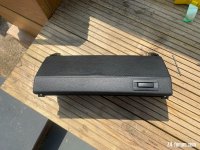
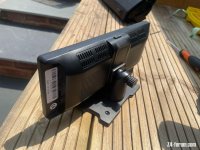
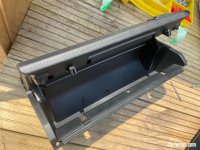
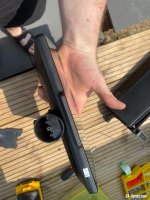
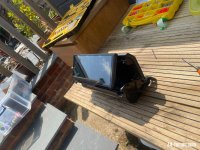
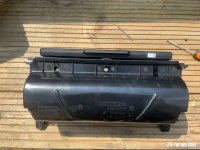
Time for cable management, I wanted to use the 12v socket and aux in the armrest, but needed to create a route between the centre console and the armrest storage, I didn't have a big enough drill bit to make a hole for the USB-C plug, but the armrest storage tray is pretty soft flaky plastic so I just ragged the bit around till the hole was big enough... :lol:
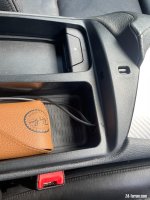
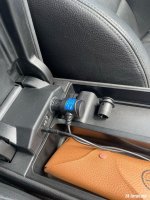
I fed to cable from the sockets, through the hole, under the centre console, behind the radio etc in the dash, and up to the screen attached to the storage bin, feeding them through the holes that would normally retain the clips that hold the storage bin closed.
The screen size is a great match! Only note for this setup is I wish I had a right-angled AUX plug for going into the screen so its not as visible, so I might just get an adaptor for that.
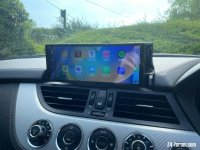
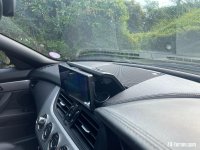
I'm an engineer so I did think about design something that allows the storage bin to still fold with the screen in but it would have meant redesigning and printing a new screen housing and hacking at the storage bin....but effort... so I'm going to see how the screen holds up over time and if it passes the test of time I might redesign it.
It all works wirelessly through Bluetooth, so the next thing to do is add a wireless charger where the ashtray currently sits.
All in all....for just over £60 and a couple of hours works, I couldn't be happier!
Bought my 23i M Sport a month ago now and it came with the storage section in the dashboard, no screen.
I always had a plan to put a screen in, whether that was a stock screen with iDrive, or an aftermarket integrated screen.
Instagram was obviously listening to me and gave me ads for stand-alone CarPlay systems that you plug in the 12v and AUX and just stick on the dash. So I rolled the dice with a cheap interface I spotted on AliExpress... knowing full well that it could turn up and I find out I've bought a picture of a screen and a bag of rocks for £60, but for that much I thought it was worth a shot! Link below to the screen I went for:
https://a.aliexpress.com/_msVR7hw
I used the first 20mins of this YouTube video (https://www.youtube.com/watch?v=VC9VFJBDFQM&t=1222s) to guide me through removing all the trim needed to access to the screws to remove the dashboard storage.
After taking the storage section out, I moved to removing the base plate from the stand for the screen (just 3 screws on the underside). After that, I drilled a hole in the front of the lower half of the storage bin, placed the screen at the front of the bin and screwed through the hole I drilled into the screen stand upright. Making sure the screen joint to the stand was as tight as possible before doing this, cos you can't get to it without plyers after screwing them together.
Time for cable management, I wanted to use the 12v socket and aux in the armrest, but needed to create a route between the centre console and the armrest storage, I didn't have a big enough drill bit to make a hole for the USB-C plug, but the armrest storage tray is pretty soft flaky plastic so I just ragged the bit around till the hole was big enough... :lol:
I fed to cable from the sockets, through the hole, under the centre console, behind the radio etc in the dash, and up to the screen attached to the storage bin, feeding them through the holes that would normally retain the clips that hold the storage bin closed.
The screen size is a great match! Only note for this setup is I wish I had a right-angled AUX plug for going into the screen so its not as visible, so I might just get an adaptor for that.
I'm an engineer so I did think about design something that allows the storage bin to still fold with the screen in but it would have meant redesigning and printing a new screen housing and hacking at the storage bin....but effort... so I'm going to see how the screen holds up over time and if it passes the test of time I might redesign it.
It all works wirelessly through Bluetooth, so the next thing to do is add a wireless charger where the ashtray currently sits.
All in all....for just over £60 and a couple of hours works, I couldn't be happier!


 Scottish Borders


