advice on OBDII cable for BMW Z4 (2005, 2.2)

macguy

Member
Hi everyone,

I have a BMW Z4 from 2005 (2.2) and I’d like to connect it to my laptop via OBDII to do some basic maintenance and diagnostics.

I already ordered one cable that came with a CD, but since my laptop doesn’t have a CD drive, I wasn’t able to install the drivers and the cable isn’t being recognized.

I’m wondering if anyone has recently bought an OBDII cable that works well with the BMW Z4 and has drivers available online (for download, without needing a CD).
Also, what’s the correct or recommended way to connect the laptop to the car’s system — is there specific software or setup I should use?

I’m using a Windows 10 laptop.
Any advice or recommendations would be greatly appreciated!

Thanks in advance,
M
 
Probably the best start up diagnostics for you and a non CD Laptop is BMW Scanner 1.4 supplied with the software on a USB stick here is a link to ebay, it comes with its cable and interface to plug into the OBD port on the car.

The older BMW Software INPA that can be run an a laptop usually comes on a CD and can be problematic setting it up so BMW Scanner would be easier.

If you want a handheld scanner then consider the Creator 310+ or 410, that just plugs in to the OBD port on the car.
 
Thank you for all the information!
I already have a handheld scanner — I bought the Thinkcar 662 model, and for basic scanning and maintenance I’m pretty happy with it.

However, @bigwinn and I are currently trying to solve an issue with my ECU. Since I can’t reach the ECU with my Thinkcar scanner, the only option left is to connect via laptop.

Based on your experience, the BMW Scanner 1.4 that comes with the software on a USB stick is the right and simplest thing to order...
 
If you got the BMW Scanner 1.4 the software can be found online to download. It is a bit of a hassle getting it to work on newer windows but it is possible. I bought a used Win XP lap top for 15e and it works great.
 
Still going to need the cable and interface to plug into the car if you download the software.
 
@macguy, I purchased this cable recently (below) and installed ISTA and INPA -Windows 11 found the USB serial right away but the software did need the ini file (configuration file) set to the correct COM port, but simple enough to do. (happy to walk you through it or theres loads of Youtube vids)
Im sure theres a few of us that are local that may be able to assist - where do you hail from ?

 
Hi everyone,

I have a BMW Z4 from 2005 (2.2) and I’d like to connect it to my laptop via OBDII to do some basic maintenance and diagnostics.

I already ordered one cable that came with a CD, but since my laptop doesn’t have a CD drive, I wasn’t able to install the drivers and the cable isn’t being recognized.

I’m wondering if anyone has recently bought an OBDII cable that works well with the BMW Z4 and has drivers available online (for download, without needing a CD).
Also, what’s the correct or recommended way to connect the laptop to the car’s system — is there specific software or setup I should use?

I’m using a Windows 10 laptop.
Any advice or recommendations would be greatly appreciated!

Thanks in advance,
M
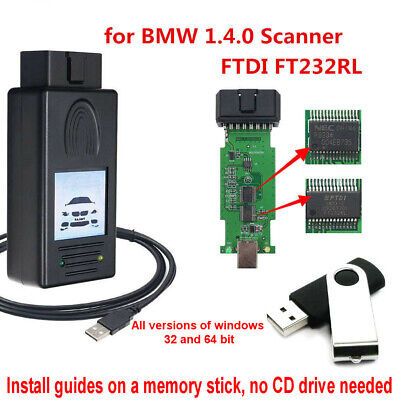
I've upgraded my cable recently, having used an Amazon one for years. This new one came with the drivers on a USB stick. But, you shouldn't need any drivers, it should be recognised by the laptop.

You do need the correct software to connect to the car, though. Search for "Mikes BMW Tools"; this will give you INPA, NCSExpert/Dummy and a few others, which will get you started for free.

The best software to get is ISTA, it's massive though so you need 80gb of free space once its installed amd more to download it and install it. I have a link to a copy that I probably cant share in here but could send you if you like.
 
USE KDCAN with INPA. It can code and programming (Update) your every ECU. You can install bimmergeek inpa toolset and import e85 daten using coding tool included in that. Maybe I should make a tutorial on how it's done from beginning to the end?

I'd say you don't need ISTA, the UI sucks. INPA toolset is enough for E-Chassis. The only valuable part in ISTA is the torque and repaire guide, but I stick with TIS software on a Windows XP Virtual Machine, because the ISTA UI sucks and anti human design.
 
Back
Top Bottom