E85/6 Z4M CarPlay/Android Auto with original hardware

On the last point, if does remember the last user however if the other user wants to use it, it will spin forever trying to start up CarPlay. If my son drives behind me in his car, he will kill my CarPlay session and I have to let it get to sleep (15 mins) before I can get it working again. I haven’t figured out a solution for that problem yet as the having to get the car asleep is taking too long as a solution.
Thanks for letting me know that. In my case as my phone connection and bluetooth streaming are different from the actual CarPlay I might just not let anybody else connect to the CarPlay itself to avoid that. And as I’m the only user of my car I think that this specific situation will not be a big problem for me.
Looking at your name, I think you are in NL? As I am Dutch I travel there regularly so if there ever is a problem that will avoid the whole input duty stuff
Yes, I’m in NL. I think we have already been communicating on the Z4 Facebook group. Thanks for the offer, if the need ever arises I’ll reach out to you.

It will be interesting to see how the signal switching would work. I have never seen an option for an OEM reverse camera for the e85, so what do you think you have in your car that has different input channels for the tuner? I am really curious to see what it is as I have never come across that
I don’t think there ever was an official reverse camera option. What I believe it was a somewhat undocumented (?) feature of the TV tuner of that platform that applying a 12v signal to a specific pin in the connector allowed it to accept an external video signal that would overide whatever the tv tuner was outputting, either the TV tuner itself or the navigation system (as I believe that is daisy chained through the TV tuner, when I removed my TV tuner my pop-up screen went completely black).

As I have what looks like a video connector (yellow plug) and a 12v connector (red plug I assume) connected into the TV tuner plugs, both a bit amateurish taped up, it leads me to believe some previous owner installed a cable harness that allows for a reverse camera / external video input. It certainly doesn’t look like a factory install. But I’m happy to be corrected by somebody more knowledgeable!
 
BTW, for the admins. It is not more useful to move this thread to the general E85/86 section as it is not really M specific?
 
  • Like
Reactions: B21
Some more info on getting an reverse camera working on the TV tuner wire harness,

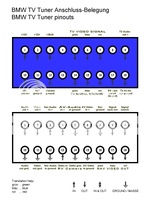
You still need to "tell" the TV tuner when to override the 16x9 signal with the backup camera input video. To do that, you need to ground pin 17 on the blue connector (probably the wire that's sticking out of the blue connector).

The easiest way to send a ground to pin 17 is by using a 4 post automotive relay (I found mine at Radio Shack). You'll need to tap into the purple wire that is the power to the backup lights on driver's side taillight. Then, tap into the brown wire (ground) from the same bundle. Now, use this power & ground to power the relay, so that the relay switches when you into reverse. Then, also using the ground from the taillight bundle, tap into that ground & run the wire to one of the other posts on the relay. Finally, run a wire from the last post of the relay to pin 17 on the blue connector of your TV tuner.

1772905580265.png

And from the manual of the harness I posted earlier.

Lose weiße Leitung dient zur Aktivierung des Rückfahrkamera Eingangs.

Diese wird mit Pin 17 an der blauen 18poligen Buchse des TV Tuners

und das zweite ende mit (Masse) Rückfahrsignal angeschlossen.

Regardless, I’m planning to use the reverse camera input on the Carphonics CarPlay unit, seems a cleaner solution.
 
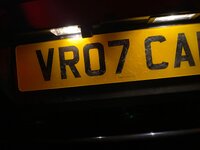
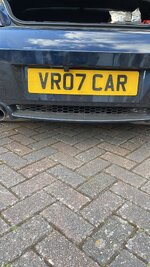
Are you planning a number plate replacement unit? I modified one to fit a standard bulb in instead of the led it comes with.
 

Attachments

  • IMG_9942.jpeg
    IMG_9942.jpeg
    765.6 KB · Views: 10
  • 9265B8AA-CBBB-493F-9502-D84DE47F814D.jpeg
    9265B8AA-CBBB-493F-9502-D84DE47F814D.jpeg
    1.6 MB · Views: 10
Are you planning a number plate replacement unit? I modified one to fit a standard bulb in instead of the led it comes with.
Yes, I am. I also saw your post on the FB group describing the camera and bulb mod you did. I still need to order those parts and will install with warmer weather. Was it difficult running the wires from the bumper and tapping the reverse light?
 
No, there is a grommet on the left side of the bumper where you can feed the wire though. I then followed the number plate light cable to the location. Just popped the light out to connect to the reverse light connection.
 
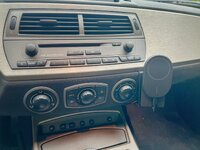
Baris from Carphonics installed his CarPlay setup in my Z4MR almost a year ago now. It's absolutely brilliant. I was prepared to accept that the original screen would make some smaller fonts harder to read, but I wanted to keep the original screen. Having CarPlay installed invisibly has been a game changer. I just setup Waze on my phone before I set off, get my playlist going on Spotify, then all I need to do is skip tracks with the steering wheel buttons on the move. The setup was absolutely perfect on a road trip to the Pyrenees last summer. I just needed to keep my iPhone plugged into the 12V charger as the Wireless CarPlay does drain the battery fairly quick on a long trip.
 
Baris from Carphonics installed his CarPlay setup in my Z4MR almost a year ago now. It's absolutely brilliant. I was prepared to accept that the original screen would make some smaller fonts harder to read, but I wanted to keep the original screen. Having CarPlay installed invisibly has been a game changer. I just setup Waze on my phone before I set off, get my playlist going on Spotify, then all I need to do is skip tracks with the steering wheel buttons on the move. The setup was absolutely perfect on a road trip to the Pyrenees last summer. I just needed to keep my iPhone plugged into the 12V charger as the Wireless CarPlay does drain the battery fairly quick on a long trip.
Agree, it is a great system while maintaining the original hardware and looks. Of course that also brings some limitations, the lack of a bigger touchscreen and ‘hijacking’ of radio buttons to control it makes it less intuitive to use than a CarPlay interface in a modern car. That is the trade-off you choose.

I generally find screen size and resolution, and fonts etc good enough to use comfortably. Where I have some issues is somewhat washed out colours and that my screen is very dim on start-up until it/the interior warms up (my car is not parked in a warm garage). Both are probably an issue due to the age of the screen. And the colour can still be tweaked quite a bit using the screen settings, I’m fiddling with that.

Furthermore I have an issue with the supplied Bluemusic dongle disconnecting (the CD changer options disappears as option), investigating if this is a dodgy unit or maybe a loose connector somewhere.

On the phone charging, I installed a Brodit Proclip with a modified Belkin Magsafe charger, all connected to a switched 12v fuse (so no drain when car is not running) which makes for a great phone charger and mount.
 

Attachments

  • IMG_4996_SnapseedCopy.jpg
    IMG_4996_SnapseedCopy.jpg
    1.3 MB · Views: 10
The supplied BT dongle is that called carplay_xxx? That is meant to drop when it switches to wifi. There should be a second BT connection which is the one connected to the cd changer. That is where my sound is coming from.

You put the sound in CD changer mode, and press the square button twice to lock it in. When I had not done that, it switched the car to TV mode which meant I lost the sound.

I have worked with 6 of these units now and every one is different 😂
 
The supplied BT dongle is that called carplay_xxx? That is meant to drop when it switches to wifi. There should be a second BT connection which is the one connected to the cd changer. That is where my sound is coming from.

You put the sound in CD changer mode, and press the square button twice to lock it in. When I had not done that, it switched the car to TV mode which meant I lost the sound.

I have worked with 6 of these units now and every one is different 😂
Ah, might be an error located between the steering wheel and the drivers seat then (ie me...).

Will try the tip of locking it in - you mean the square button next to the phone/info button?

I have the following connections:
Carphonics_bXXX (the carplay unit)
Carphonics_BT (the Bluemusic dongle)
 
Well after some issues with the Bluemusic dongle, Baris at Carphonics sent me a replacement unit. And during my 2 x 1 hour commute it worked perfectly today. So probably just a flaky unit.

Also my combination reverse camera / number plate light is making it’s way from China, so that is the next little project on the infotainment side of things.
 
Last edited:
  • Like
Reactions: pvr
Back
Top Bottom