
You are using an out of date browser. It may not display this or other websites correctly.
You should upgrade or use an alternative browser.
You should upgrade or use an alternative browser.
What have you done to your E89 today
- Thread starter Bombur
- Start date

 Scottish Borders
I think if the drive is dead then it times out and hangs ..if the drive is corrupt then it may boot then hang or not work on maps etc…If the HDD crashes, you lose stored music and satnav maps. But does it impact the CIC unit, I mean is the system able to boot and function normally even with a dead hard drive?

My starter into this topic back in 2019:Something nice n geeky for those whose previous technical forays were agonising over which colour to paint their alloys…
Here is the CIC computer which powers the idrive screen and system.
Welches Dateisystem hat die interne Festplatte?
Das wird bestimmt ein längerer Sonntagnachmittag mit den ganzen Downloads und Installationen der QNX Betriebssysteme, die man für die QNX Partitionen braucht :D Ok ich hätte jetzt eher vermutet, dass der untere Temperaturbereich
Yes, so it is.There's a chicken and egg issue..you have to copy the image of the hard drive BEFORE it fails..then its too late.
But there is a fallback solution available.
A working clone can be built on QNX, Unix, Linux, Windows 7 up to 11 with several standard tools, but not all.The drive was formatted and used in a Unix system (QNX) that idrive on E89/90 uses.
So any normal PC file utilility will fail.
AOMEI backupper is a freeware tool, that works fine on Windows.
The bottleneck is and stays the old IDE interface used by the harddisc. As a SATA2IDE interface is required to mount a modern SSD, this bottleneck stays in place and hardly any perfomance improvements will be available. Somebody remarked, that searching in a big music collection will be faster.Apart from better reliability the SSD has much much faster I/O…over 10 times faster at 50m/bytes per sec
So…your menus won’t operate faster but any map function will be a lot quicker…
But, building a working clone is not that easy and it took lot's of tests to validate different SSD models available on the market in combination with several available SATA2IDE interfaces.
Most combinations did NOT work in my E89.
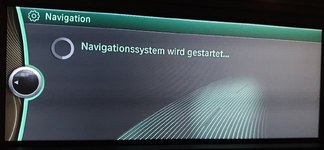
Others worked fine, but the parts were not available anymore on the market after a short period or crashed even due to different firmware versions of the SSD's!.
Once again a funny game.

Nevertheless, my SSD clone is working fine since 2019 without any issue and also survived several satnav updates provided by BMW.
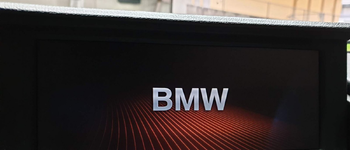
Yes it does. The CIC unit doesn't boot anymore, it will stay hanging on the boot screen.If the HDD crashes, you lose stored music and satnav maps. But does it impact the CIC unit, I mean is the system able to boot and function normally even with a dead hard drive?
Last edited:
My starter into this topic back in 2019:
Welches Dateisystem hat die interne Festplatte?
Das wird bestimmt ein längerer Sonntagnachmittag mit den ganzen Downloads und Installationen der QNX Betriebssysteme, die man für die QNX Partitionen braucht :D Ok ich hätte jetzt eher vermutet, dass der untere Temperaturbereichwww.zroadster.com
Yes, so it is.
But there is a fallback solution available.
A working clone can be built on QNX, Unix, Linux, Windows 7 up to 11 with several standard tools, but not all.
AOMEI backupper is a freeware tool, that works fine on Windows.
The bottleneck is and stays the old IDE interface used by the harddisc. As a SATA2IDE interface is required to mount a modern SSD, this bottleneck stays in place and hardly any perfomance improvements will be available. Somebody remarked, that searching in a big music collection will be faster.
But, building a working clone is not that easy and it took lot's of tests to validate different SSD models available on the market in combination with several available SATA2IDE interfaces.
Most combinations did NOT work in my E89.
View attachment 288864
Others worked fine, but the parts were not available anymore on the market after a short period or crashed even due to different firmware versions of the SSD's!.
Once again a funny game.
Nevertheless, my SSD clone is working fine since 2019 without any issue and also survived several satnav updates provided by BMW.
Yes it does. The CIC unit doesn't boot anymore, it will stay hanging on the boot screen.
View attachment 288865
So the trick is to pick the right SSD..I’m using a PATA design SSD..this is pin, format, data compatible with the old HDD..therefore it works transparently and perfectly…the previous one in my old 20i has now run for over 5 years without any issues..
In terms of throughout life is much more complex than simple streaming rate I/O
The file structure, the data structure amongst other variables has a profound effect on real world performance.
Latency is a big issue in any program and HDDs suffer badly on this ..hence why on a windows pc a ssd as a boot device gives such a big boost to perceived usability..
The fact that the SSD does not suffer from the delay caused by data fetches requiring the movement of the heads is a big change..block / data look up tables, hash tables, sort tables etc are all accessed much faster when interspersed with ‘simple’ data fetches for rendering data..
We don’t know how the programs were written but unlike say streaming audio / video it’s unlikely that data is stored continuously or in a format that allows sustained modes which in themselves would flood the I/O limitations of various bits of hardware…
In the real world what I do notice is that zooming on the map is much faster…for me that’s the primary benefit ..
When I’m hooning the ability to go to the idrive map and zoom in and out for route awareness / situational awareness prior to going back to CarPlay maps is a great asset..
So it’s not a revolution but it’s incremental improvement..it’s faster in a real world application, it’s more reliable and of course it was fun doing it!
That is the kings's way and most expensive I know.So the trick is to pick the right SSD..I’m using a PATA design SSD..this is pin, format, data compatible with the old HDD..

Here in Germany those PATA-SSD's were sold around 200€ compared to simple 128GB SSD's placed on an SATA2IDE adapter for in total ~40-60€. The latter was tricky and many combinations failed on booting in the car even due to minor firmware differences on the same hardware, not already while restoring an image.
The way I look at it…each day of my time is worth £400…That is the kings's way and most expensive I know.
Here in Germany those PATA-SSD's were sold around 200€ compared to simple 128GB SSD's placed on an SATA2IDE adapter for in total ~40-60€. The latter was tricky and many combinations failed on booting in the car even due to minor firmware differences on the same hardware, not already while restoring an image.
If I’m spending time and I’m not enjoying it / getting somewhere with it..then ..just pay the cash to short circuit / go direct !
In the UK the PATA are around £100..
Maybe try a multi tera byte RAID array?..because you can!


So moved on to the various media related items today..
Boot was stripped out..but required lots of heat in the garage as those plastics get VERY brittle when they get cold..
The easy ‘bug’ was ‘ticked’..I’d wired up the radar units for the blind spot system to the ID4 digital cluster ‘correctly’ AFAIK. But ..the pin outs must have been transposed into the cluster itself…net result was when I was overtaken on a motorway (rare event) the left hand side warning went off…
Anyway swapped over the two connectors in the rear boot area to sort that out..
Lost quite a few plastic clips as they ping’d off…I’ll find them shortly..
Onto other matters..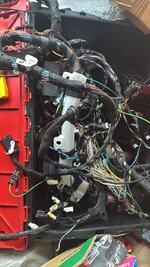
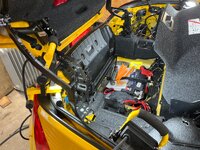
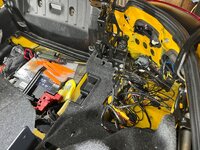
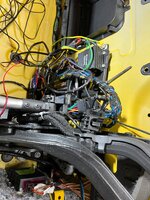
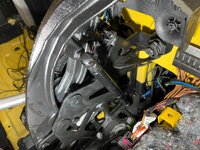
Boot was stripped out..but required lots of heat in the garage as those plastics get VERY brittle when they get cold..
The easy ‘bug’ was ‘ticked’..I’d wired up the radar units for the blind spot system to the ID4 digital cluster ‘correctly’ AFAIK. But ..the pin outs must have been transposed into the cluster itself…net result was when I was overtaken on a motorway (rare event) the left hand side warning went off…
Anyway swapped over the two connectors in the rear boot area to sort that out..
Lost quite a few plastic clips as they ping’d off…I’ll find them shortly..
Onto other matters..

 Ohio
Ohio
That's so bright and easy to see everything with the yellow. Dark blue needed some extra lumens.
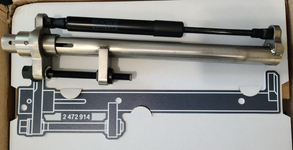
While you're in there, I have a tool to replace those struts!
I just cleaned Dorothy up with some new Meguiar's Total Interior Clean and a Rubbit Bunny Buffer waterless wash and finished off with their graphene shield. All decent products, it was too cold for me to do anything longer than that unless I heat the garage.
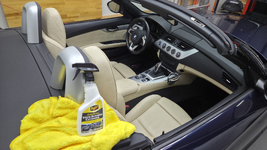
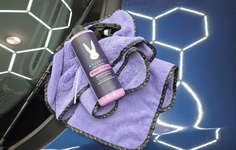
While you're in there, I have a tool to replace those struts!
I just cleaned Dorothy up with some new Meguiar's Total Interior Clean and a Rubbit Bunny Buffer waterless wash and finished off with their graphene shield. All decent products, it was too cold for me to do anything longer than that unless I heat the garage.
Bought it! Albeit from Deutchland!That's so bright and easy to see everything with the yellow. Dark blue needed some extra lumens.
While you're in there, I have a tool to replace those struts!
View attachment 288984
I just cleaned Dorothy up with some new Meguiar's Total Interior Clean and a Rubbit Bunny Buffer waterless wash and finished off with their graphene shield. All decent products, it was too cold for me to do anything longer than that unless I heat the garage.
View attachment 288981
View attachment 288983
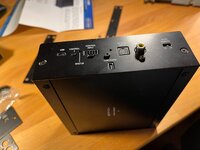
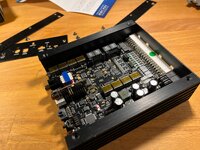
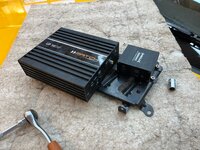
So various tasks..
Fitted a few shelves in the garage to act as 'scratch' areas to rest tools / bits of car rather than all lying on the floor!
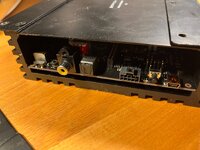
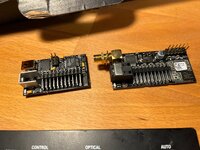
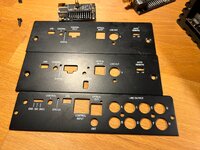
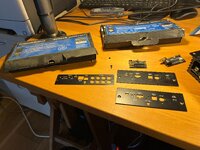
Reassembled the Match 10 DSP/amp with its new USB direct input card back on to the old 677 frame with the Helix MOST 25 to digital optical box.
Bolted that back in..had a minor heart failure with no sound..however helps if you connect the MOST 25 bridge box to the Match 10 with the optical cable..strange no sound without that baby in place.
Need to get the USB cable from the rear bulkhead to the centre armrest cubby hole..thought I might have to strip the whole back out.
However my new toy a flexible picker upper helped me route the cable (and the remaining reverse camera cable) through the gap in the bulkkhead into the cabin..
I think by just lifting the bottom of the csrpet trim up from the bottom I'll be able to get the cables through!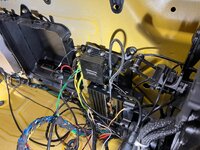
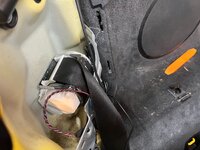
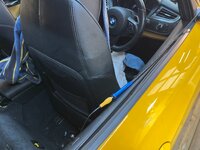
Fitted a few shelves in the garage to act as 'scratch' areas to rest tools / bits of car rather than all lying on the floor!
Reassembled the Match 10 DSP/amp with its new USB direct input card back on to the old 677 frame with the Helix MOST 25 to digital optical box.
Bolted that back in..had a minor heart failure with no sound..however helps if you connect the MOST 25 bridge box to the Match 10 with the optical cable..strange no sound without that baby in place.
Need to get the USB cable from the rear bulkhead to the centre armrest cubby hole..thought I might have to strip the whole back out.
However my new toy a flexible picker upper helped me route the cable (and the remaining reverse camera cable) through the gap in the bulkkhead into the cabin..
I think by just lifting the bottom of the csrpet trim up from the bottom I'll be able to get the cables through!

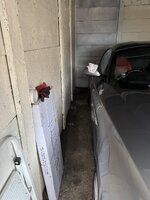
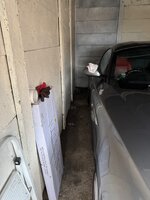
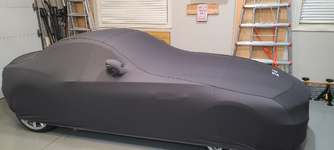
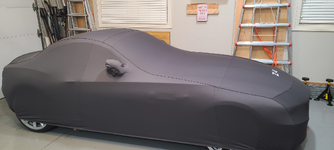
I went to see it! Too much snow, ice and salt here just now. wonder if I should cover it up?
Yes -- how would you feel if you were on a cold floor all winter... get some thermals on!
Attachments
A mixed day of odd jobs..had the heaters going full blast to raise the garage temp from a -5c this morning..working on trim when that cold is fraught with failures..
So since I fitted a direct USB support additional card to the DSP/amp I had to update the config of the DSView attachment 289123View attachment 289124View attachment 289125View attachment 289126View attachment 289127View attachment 289128P/amp from the laptop to add the ability to use and manage the USB card.
Started on the combination of..
Removing the OLD CIC I used whilst mine was being repaired..
Removing the centre tunnel unit to allow access to routing the rear camera to the Mr 12 Volt box
Removing the dash trim to get to the Mr 12 Volt box for a latest firmware update (needs the micro SD slot) plus the bug fix to address ios26/iphone 17..which strangely goes through the usb port..
The push start bezel edges are wearing through the black paint..so I've tried some rattle can satin black..if it doesn't look good I'll buy a new bezel..not red ..not chromed..
So since I fitted a direct USB support additional card to the DSP/amp I had to update the config of the DSView attachment 289123View attachment 289124View attachment 289125View attachment 289126View attachment 289127View attachment 289128P/amp from the laptop to add the ability to use and manage the USB card.
Started on the combination of..
Removing the OLD CIC I used whilst mine was being repaired..
Removing the centre tunnel unit to allow access to routing the rear camera to the Mr 12 Volt box
Removing the dash trim to get to the Mr 12 Volt box for a latest firmware update (needs the micro SD slot) plus the bug fix to address ios26/iphone 17..which strangely goes through the usb port..
The push start bezel edges are wearing through the black paint..so I've tried some rattle can satin black..if it doesn't look good I'll buy a new bezel..not red ..not chromed..
hmm.. these requirements. Not red, not chromed... Buyer has means.... Tiffany and Co. option is best fit.The push start bezel edges are wearing through the black paint..so I've tried some rattle can satin black..if it doesn't look good I'll buy a new bezel..not red ..not chromed..

I'm just really glad you didn't bust on Dorothy's blue fetish. Start/Stop matching trunk release.
Well, if that had been my motivation, I should never have started working on the E89 topics.…each day of my time is worth £400…

For sure..altruism is a wonderful thing…you WILL go to heaven!Well, if that had been my motivation, I should never have started working on the E89 topics.


 Whitchurch
Where did you get your replacement struts?Fitted 2 new boot gas struts.
Originals were weak and had been squeaking for at least 5 years or more.
Didn't realise how bad the originals were.