Roof service past error A6A5 and trunk stuck open shells in but not latched

As mentioned days ago:
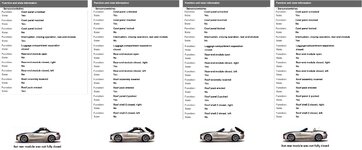
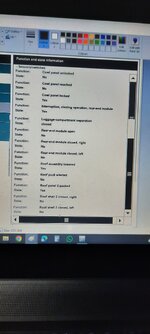
  1. CTM List of roof sensor states
    1761811762026-png.286435

    This view represents the sensor status of one of your former pictures from the video:
    1761812341922-png.286436

You current post:
1762333693252-png.286674


The ISTA view on the right is identic to your former post and describes the above marked position on the video.

The left one from the documentation document is misleading! It's a much more dynamic process and and the switches will change their states over the complete process of 20 seconds, not only in 4 different static steps. You may not compare both lists this way.

If the pump doesn't start, any of the preconditions might not be fulfilled. Can be checked with INPA/ISTA as well.

What about the roof basics?
  • Salmon relays at the hydraulic pump, already renewed?
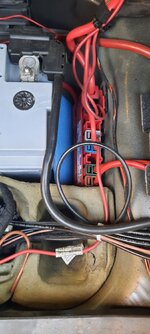
  • Power supply on the red fuse box next to the battery. The gray connector permanently has to support with +12V.
 
Last edited:
The left one from the documentation document is misleading! It's a much more dynamic process and and the switches will change their states over the complete process of 20 seconds, not only in 4 different static steps. You may not compare both lists this way.

You are absolutely right, but I moved the shells manually and lowered the rear module also manually. What I mean is that the rear module never lowered while the shell not latched in position. So what I am trying to say that I will try to put the states of parts in acceptable positions to the CTM. So I will raise the lid and lock the two pressure relieve valves on top of the pump.
If the pump doesn't start, any of the preconditions might not be fulfilled. Can be checked with INPA/ISTA as well.

How with ISTA?
What about the roof basics?
  • Salmon relays at the hydraulic pump, already renewed?
I have changed them before three to four months.
  • Power supply on the red fuse box next to the battery. The gray connector permanently has to support with +12V.
When I check with both ISTA and scan tool both read 12.5 v. I suspect the fuse box in front of the passenger seat "under the glove box"
When I press the button, the state in ISTA changed to pressed or activated. And I hear click never hear it when the roof was operated normally. Is there fuse in the fuse box for the system?
 
When I check with both ISTA and scan tool both read 12.5 v. I suspect the fuse box in front of the passenger seat "under the glove box"
Please read it precisely

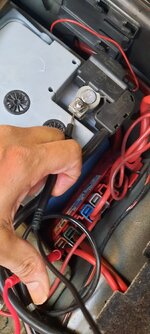
The red fuse box next to battery in the trunk, gray connector on top. A multimeter is required.
 
Please read it precisely

The red fuse box next to battery in the trunk, gray connector on top. A multimeter is required.
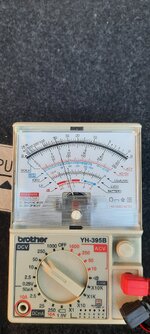
Did you measure the grey one as well or only the brown one like on the photo? All of these connectors should deliver +12V (or ~14V while the engine is running).
 
Did you measure the grey one as well or only the brown one like on the photo? All of these connectors should deliver +12V (or ~14V while the engine is running).
Both "actually all" of them showing 12+v and 14+v while engine is running.
 
I open ISTA and connect to the CTM reading sensors state, I record the screen and upload the video while doing the following
I started recording while the two roofs are packed onto the top cowl and the rear module down but not closed, then I asked a help from friend to lift the rear module we held it in position by two supports, I jumped to the screen and scroll down and up again, then we start lifting the roof pack and put it inside the trunk " not sure if I scroll the screen down or not" then we lower the rear module while recording, this is the video


I think now all sensors are working fine, and signal shows better wire condition.

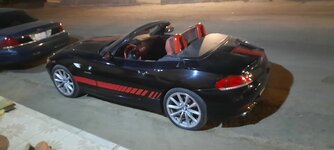
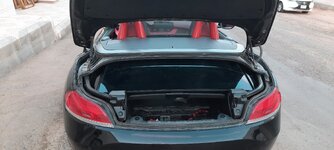
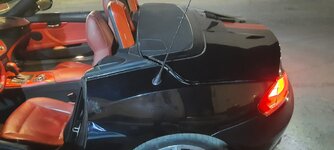
The state of the car now
20251108_190734.jpg

I noticed that moving some parts manually create some problems, for example, the rear module lowered manually, the mechanism did not fold inside fully. I will show a picture to clarify what I mean...
 
Last edited:
Sorry, I'm out.
Wishing you an enjoyable time....
Don't understand neither the strategy nor the ISTA view.
sorry, you are right, hard to understand when it is described with images and long video waiting for changes.
So I summarize the process and sensor states in this picture
summary.jpg
in Summary, all sensors are now working OK. But still roof system error appearing and I drive the car just around the house in order to move the tyres a bit, "not latched" warning appeared on the dash.
 
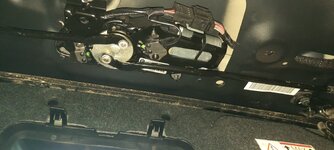
Could this be a faulty locking mechanism above the windscreen or faulty micro switch for the lock?
 
Could this be a faulty locking mechanism above the windscreen or faulty micro switch for the lock?
I've been thinking about the issue, and I believe it started when the rear module got stuck open. I think the locking mechanism isn't working, as it's showing "roof not latched" on the dash.

To troubleshoot, I'd like to know:
- How can I jump the mechanism to see if the motor is working?
- Can I measure the signal to check if the CTM is sending the order to latch and lock the pack in place?
 
I have had experience of the locking mech being faulty

It was simple to take the headlining off and check movement and supply, to then replace the motor
 
I have had experience of the locking mech being faulty

It was simple to take the headlining off and check movement and supply, to then replace the motor
I want to check if it's receiving signal from the CTM before replacing the motor. "roof system" on the screen goes off when press the buttons, but back again once release the button. I guess that the CTM try to lock the pack in the trunk or to windscreen but no success so once I release the button "roof system" appears on the screen.
 
As I said, I don't understand the strategy.

The messages on the dashboard are completely useless for diagnosis, as they only show expected results but no activities to take the roof to the next step in this very complex process.

What is the indication for a defective front locking system? Signals are available and ok regarding the current position. I wouldn't expect a failure on this component .

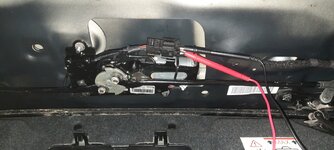
Have you checked the hydraulic pump's motor? You can test it with two external wires between the battery and the motor's 4-pin connector.

Disconnect the black 4-pole connector from the motor in the trunk. The two violet wires come from the temperature sensor in the motor. Don't touch it.

Red & black wires are to be connected against the battery for just a very short moment.

If the motor starts, immediately disconnect the external wires from the battery and swap them. Does it then also rotate in the opposite direction?

It was simple to take the headlining off and check movement and supply, to then replace the motor
But it's much simpler to check it on the 2-pole connector of the CTM.

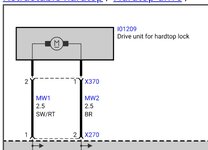
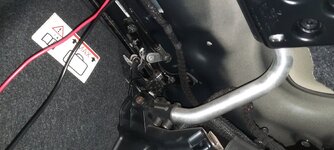
Same test can be executed with the motor of the front locking system of course. The 2-pole plug of the CTM has to be disconnected. As next bring plus and minus from the battery onto these 2 poles of the cabling to the front.
Reversing the polarity makes the motor run in the opposite direction.

But, much, much easier this component can be tested with INPA/ISTA. Just select the CTM and execute the front locking system. The changing signals from zhe two sensors (microswitches) can be checked by INPA/ISTA as well.


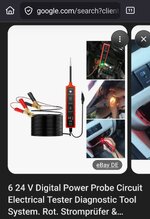
Generally I use a power probe test tool for these steps to avoid any damage by "wild flying" wires.
Screenshot_20251109_094018_Firefox.jpg
 
Last edited:
What is the indication for a defective front locking system? Signals are available and ok regarding the current position. I wouldn't expect a failure on this component .
The indication is that before the defect, I initiated opening process, everything was OK, windows lowered, shell 2 packed on top of shell 1, package was unlocked from windscreen "or maybe this after next step, trunk lid unlock and open, packaged shells into the trunk.... at this moment the lid stuck open. it is stuck open because the pack did not latched "I guess".
Also when I depressurized the hoses and lift the pack to the windscreen, it did not lock and till now won't do it. So, either the signal not reaching the mechanism or the motor jammed or failed. That's why I will try checking the signal and if it reaching the motor that means the motor is broken or jammed.
Have you checked the hydraulic pump's motor? You can test it with two external wires between the battery and the motor's 4-pin connector.

Disconnect the black 4-pole connector from the motor in the trunk. The two violet wires come from the temperature sensor in the motor. Don't touch it.

Red & black wires are to be connected against the battery for just a very short moment.

If the motor starts, immediately disconnect the external wires from the battery and swap them. Does it then also rotate in the opposite direction?
I have just tried this, the motor moves both ways and the pressure reached the pack and move it a bit.
But it's much simpler to check it on the 2-pole connector of the CTM.

Same test can be executed with the motor of the front locking system of course. The 2-pole plug of the CTM has to be disconnected. As next bring plus and minus from the battery onto these 2 poles of the cabling to the front.
Reversing the polarity makes the motor run in the opposite direction.

But, much, much easier this component can be tested with INPA/ISTA. Just select the CTM and execute the front locking system. The changing signals from zhe two sensors (microswitches) can be checked by INPA/ISTA as well.
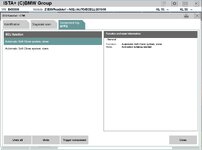
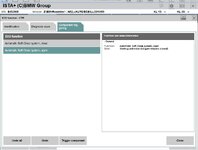
I selected the CTM but it does not show locking system, only soft close system as shown in the following figures
soft1.jpg

soft2.jpg

Is it somewhere else or shall I just jump connect the motor?

The tester you mentioned looks pretty useful, I bought one. Thanks.
 
Pretty good!
Just checked it with ISTA as well:
the option to test the front locking system is missing. :cry:

Obviously it's only available in INPA. Any chance that you will get INPA installed as well?

If not, just bring plus and minus on the 2-pole plug at the loom to the CTM. It's directly connected to the front motor.

In parallel you can track the status of the 2 microswitches with ISTA.
 
Obviously it's only available in INPA. Any chance that you will get INPA installed as well?
I did installed INPA, but cannot find E89
Used E90 but then gave up and installed INSTA.

I will try direct connection to the motor.
If not, just bring plus and minus on the 2-pole plug at the loom to the CTM. It's directly connected to the front motor.

In parallel you can track the status of the 2 microswitches with ISTA.
 
I did installed INPA, but cannot find E89
Used E90 but then gave up and installed INSTA.
That might be just a configuration detail.

There is a config file called INPA.INI, where the different models can be assigned to the INPA main view.

These are the required steps:

 
Last edited:
Back
Top Bottom