CarPlay and iOS 26 and Mr 12 Volt

B21

Elite
 Scottish Borders
Site Supporter
As reported elsewhere some of us now have a bug where if you are using the original BMW Bluetooth phone connection rather than the MMI Bluetooth phone connection, the unit dials yourself on boot up..switching to the MMI Bluetooth by disabling the BMW Bluetooth connection for the phone works..

Allegedly Mr 12 Volt are aware of a number of such bugs.

In seperate news…

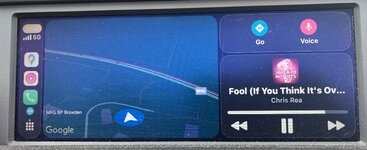
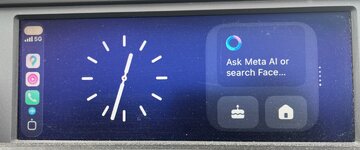
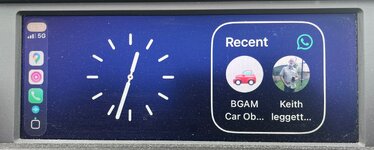
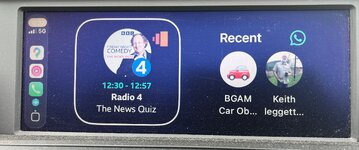
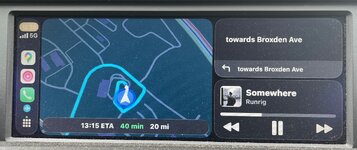
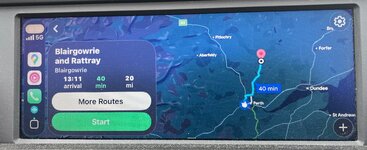
There’s not much change apart from the new ‘liquid’ iOS26 look which I promptly disabled for the benefit of visual clarity…things can get tricky to see if the sun is in the wrong direction roof down..that stupid effect impairs things even more…

There’s a new ‘widget’ that gives you two BIG images of either info or to act as a launch button..

A side effect is that pressing the ‘Back’ button in the idrive controller now doesn’t get you back to the three way split screen with map/media/driving guidance ..in this case you have to scroll down to the 9 little squares on the side bar..

First world problems..

Still by a long long way the best media interface for a car..IMG_0544.jpegIMG_0545.jpegIMG_0546.jpegIMG_0547.jpegIMG_0548.jpegIMG_0549.jpeg
 
Last edited:
I had pretty much decided I wasn’t going to bother with a mr12volt kit and suck it up with the OEM pro nav, but each time someone posts pictures of the CarPlay display on the E89 screen it just looks a million times better!
 
I had pretty much decided I wasn’t going to bother with a mr12volt kit and suck it up with the OEM pro nav, but each time someone posts pictures of the CarPlay display on the E89 screen it just looks a million times better!
Yup that’s the paradox…the screen isn’t bad ,it’s the s/w that BMW built that was ok in its day but obsoleted quickly…

However CarPlay rewrites the rules..the CarPlay interface is what I call a “toys r us” type interface…very simple uncluttered and un fussy but very well thought out ..

With CarPlay you get more or less the same rendition be it 5/8/10.5/12 inch display..

An android head unit in comparison is a bit like the old idrive but actually for an automotive application it’s too fussy in the cockpit..

That’s why I binned my 12” and then 10.5 android units…waste of money, space and ruined the e89 cockpit lines …
 
Yup, not a fan of those aftermarket screens. I have CarPlay in my Q7 and Golf too and miss it in the Z4, but the mr12volt units are a serious price!
 
They are expensive but it's a well thought out kit and has software updates etc and decent sound quality so you have to factor the 'ease' into it.

I've held off for a year but decided to take the plunge and have stripped the car this morning in readiness for the box to arrive.

What I'm a bit curious about is how easy it would be to retain the factory USB port in the armrest to use with the Mr12Volt. Where does that connect to? Is it the head unit or the box in the boot?

I'm guessing @AnubisZed will know.....
 
I've done a bit more reading, and yeah looks like the USB is connected to the MULF in the boot.

Seems like the entire centre console needs to come apart, which doesn't feel like fun.
 
They are expensive but it's a well thought out kit and has software updates etc and decent sound quality so you have to factor the 'ease' into it.

I've held off for a year but decided to take the plunge and have stripped the car this morning in readiness for the box to arrive.

What I'm a bit curious about is how easy it would be to retain the factory USB port in the armrest to use with the Mr12Volt. Where does that connect to? Is it the head unit or the box in the boot?

I'm guessing @AnubisZed will know.....
As you've just posted as I was about to answer you ;)

Yes it's connected to one of the following, depending on vehicle options, MULF, Combox, or USB Hub.
You could disconnect it and then make up a connector for the Mr12volt USB lead, but to be honest it's a lot of messing around for probably very little gain.
I always feed the USB into the back of the glovebox, so it's available for whenever you use it. Unless you're playing video via the Mr12volt box (highly NOT recommended to be playing video while driving!), the only other thing would be playing music files, but then your current USB does that anyway. Playing music via the Mr12volt USB knocks out CarPlay/Android Auto, so you're gaining nothing.
I also recommend a Micro USB extension cable to be fed into the rear of the glovebox as well, for any future updates (I beleive one may be coming soon for the current CarPlay issues).

Hope that helps
 
That makes sense, and yeah I guess I may as well just continue to use the USB for playing music through CIC as before.

Daft question but I assume you can use either the MMI box or one of the other sources?

Or can you use radio / MP3 from CIC whilst using the CIC for Waze etc? I can always stream / download but it's nice having the option...

Thanks for your response BTW, and your videos. I've watched them a fair few times and had YouTube on my phone whilst stripping the car to help with taking the trim apart!
 
Last edited:
The aftermarket MMI boxes (generic or Mr12volt) both capture the screen to show CarPlay/AA. Which means that they are displaying over the top of what the CIC gives out. The Mr12volt does it in a way of using one of the CD Multichanger locations, so is more integrated into the architecture of the CIC system, whereas the other ones just interupt the video flow. The problem with this is that you can't hear anything else, ie; you can't play the radio at the same time as a CD, it works on this same principle
 
Okay, yeah I assumed that's how it worked (and how the cheap ones work).

Makes sense, just need to make sure I have some playlists downloaded to my phone then.
 
Last edited:
What Dave said..... ;) His videos are pretty much all you need.

The glovebox part particularly is a bit tricky as it is quite well put together and there were far more screws than I was expecting, having taken various other cars apart for similar jobs...

I was quite impressed with the interior fit and finish quality. You can see how / why people might assume that German cars are well-engineered on the basis of the interior even though it's unrelated to what lies beneath the bonnet.

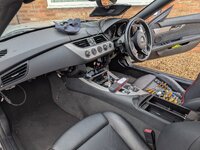
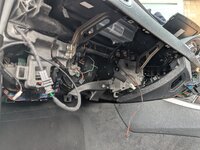
Here are a couple of pics of everything apart in readiness for the box to arrive (the removed bits are in the boot). According to a VIN decoder I do have CDC prep, and the wiring appears to be there behind the glovebox.

I also had the cill trim out and some of the panels in the boot to run a cable as I'm taking this opportunity to fit a reversing camera. Finally, while everything is apart and accessible I figured I would replace the pollen filter too.
 

Attachments

  • PXL_20251018_092830649.MP.jpg
    PXL_20251018_092830649.MP.jpg
    873.4 KB · Views: 8
  • PXL_20251018_092824494.jpg
    PXL_20251018_092824494.jpg
    866.8 KB · Views: 6
Last edited:
Looking to install this as well. Is it easy to route the microphone splitter back to the harness? Is only the steering wheel surround (top and bottom) needed to be removed?
 
Looking to install this as well. Is it easy to route the microphone splitter back to the harness? Is only the steering wheel surround (top and bottom) needed to be removed?
Yes and yes :thumbsup:
Start at the wheel end, plug the microphone Y cable into your existing microphone loom then run the wire over the top of the steering column (securing it safely), then with one hand in the headunit aperture find the opening at the right rear side and feed the wire in from the footwell side with your other hand. Once you've got it pull it all through then feed it via the same route as the rest of the box wires to the box and plug it in, tidying the slack up. (y)
 
It's in.... Took about an hour I guess, mainly making sure everything was routed nicely and then the struggle of pushing the looms down into the space below the rear of the HU.

I think the cable for the quadlock could do with being longer so that everything can be neatly pushed into the void and then there's just cables to keep out of the way rather than connectors...

When I first powered on it didn't seem to work (I thought maybe CDC wasn't coded correctly) but then I turned it off and on again and it all seemed to work fine. Pairing was quick and easy and it seems to be set up for RHD as well.
 
  • Like
Reactions: B21
The only issue I have is that the voice button kicks me back into iDrive.... Once I cancel it's back into Mr12Volt.

I need to watch Dave's video again to work out what needs changing in the vehicle config (and to get hold of BMW Tools).

The camera and microSD extender haven't arrived yet so I've got some time before it all goes fully back together. Just the glovebox out now though, I used the car earlier.
 
Last edited:
It's in.... Took about an hour I guess, mainly making sure everything was routed nicely and then the struggle of pushing the looms down into the space below the rear of the HU.

I think the cable for the quadlock could do with being longer so that everything can be neatly pushed into the void and then there's just cables to keep out of the way rather than connectors...

When I first powered on it didn't seem to work (I thought maybe CDC wasn't coded correctly) but then I turned it off and on again and it all seemed to work fine. Pairing was quick and easy and it seems to be set up for RHD as well.

I assume you don't mean an hour from start of the install to the finish?!
 
The only issue I have is that the voice button kicks me back into iDrive.... Once I cancel it's back into Mr12Volt.

I need to watch Dave's video again to work out what needs changing in the vehicle config (and to get hold of BMW Tools).

The camera and microSD extender haven't arrived yet so I've got some time before it all goes fully back together. Just the glovebox out now though, I used the car earlier.
Apple or Android ?

Apple (CarPlay) - If your phone is in earshot, then just say "Hey Siri" and it should activate and you can continue from there.

Android (Android Auto) - Scroll/flick to the sidebar, scroll to the microphone icon, press the controller and talk to Google as normal.

No need to press the steering wheel button. I appreciate that's a bit more than it should be, but this is the same in some cars that have it built-in, so it's not a Mr12volt issue.
 
The only issue I have is that the voice button kicks me back into iDrive.... Once I cancel it's back into Mr12Volt.

I need to watch Dave's video again to work out what needs changing in the vehicle config (and to get hold of BMW Tools).

The camera and microSD extender haven't arrived yet so I've got some time before it all goes fully back together. Just the glovebox out now though, I used the car earlier.
For what it's worth, my Andream MMI works perfectly with the steering wheel voice button. Equally I tested it yesterday without using the button, "Hey google" command worked. Best of both worlds.
 
Back
Top Bottom