E85/6 Z4M CarPlay/Android Auto with original hardware

Beedub said:
i can see a lot of these conversions happening in 24, as said before this now makes the NAV cars once again a fantastic option and not the undesirable option it became! ill get one ordered up in the new year and document the install.

I have been reading this thread with interest, along with a bunch of others related to E85/E86 audio and screen upgrades.

It's time for me to decide whether to pass my E86 Coupe to someone else or invest some time and money into refreshing it.

I have the NAV option, so I totally get the "undesirable option" point. It looks like Baris' solution has become the go-to for this, or at least I’ve seen nothing better in terms of keeping the OEM look. Is that still the case?

I don't really know how control functions (clock, trip, etc.) work without the screen on non-NAV cars, so I thought I’d ask the those in the know.
Has anyone removed or considered removing the NAV entirely, replacing the entire dash with one that does not have the cut-out for the screen, and falling back to just the single DIN head unit, either OE or replacement? For me, I’d be quite happy with the option to listen to some music or just that 3L engine whilst driving about. I am really not fussed about the screen and NAV.

Would that work? Anyone think that’s a bad idea from an originality or future resale / reversibility perspective? Anyone currently screaming at this post, going "dear God, don't do that"? :)
 
Your last line :lol:

Why flimper a car that is perfect with a great CarPlay option into something that isn’t? I was specially looking for a car with satnav screen to be able to do this again as I did it on my previous si as well
 
Thanks! I will put you in the firm "No, just no" column :D

I take it your Baris solution is holding up nicely then?

pvr said:
Why flimper a car
On an side note, I have now learned the verb "to flimper". Every day is a school day :thumbsup:
 
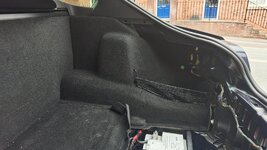
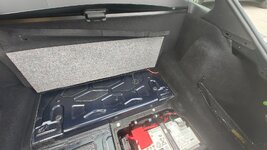
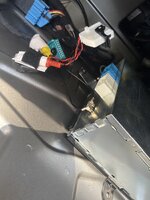
Has anyone on here installed this system on an E86? Could you give me some pointers on removing the trim pieces in the boot so I can have a look at the existing wiring.
 
I am working on an E86 in a couple of weeks, so can let you know then. I installed an Intravee years ago in en E86 but that is too long ago to remember the exact dismantling process. It was easier than in an E85
 
I am working on an E86 in a couple of weeks, so can let you know then. I installed an Intravee years ago in en E86 but that is too long ago to remember the exact dismantling process. It was easier than in an E85
If you could that would be a massive help. Managed to remove a few trim pieces but then I'm stuck. Think the plastic trim on the top left needs to come out first but not sure how.
 

Attachments

  • IMG_20250727_173206871.jpg
    IMG_20250727_173206871.jpg
    799.2 KB · Views: 12
No, you lift the carpet from the bottom up and support it. The side pieces may need to come out to be able to do that though. I
 
The carpet on the back panel is sandwiched in by the side pieces. Can't seem to remove the side pieces without removing all the plastic trim at the top.
 
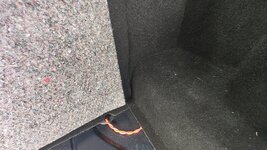
The bottom part is velcro so can be pulled up. What flexibility do you get at the section against the vertical carpet? That is what needs to be lifted up - specifically right in the centre to be able to get to the back of the CD changer cables
 
I can lift the bottom back section up. There's not a lot of flexibility in the back panel. It seems quite snuggly fitted behind the side panels.
 

Attachments

  • IMG_20250728_150902207.jpg
    IMG_20250728_150902207.jpg
    651.8 KB · Views: 11
  • IMG_20250728_150926683.jpg
    IMG_20250728_150926683.jpg
    1 MB · Views: 9
I can lift the bottom back section up. There's not a lot of flexibility in the back panel. It seems quite snuggly fitted behind the side panels.
This is different on the E85 to the E86. On the E86, the bulkhead and floor carpet are one piece. On the E85, they are two different pieces - the bulkhead + boot floor are not joined together.

I have replied on your other thread.
 
Could you give me some pointers on removing the trim pieces in the boot

Try this video it helped me the first time I did it. Watch the whole carpet removal part first before deciding which bits you need to remove to get where you want to as this is for doing the shocks :thumbsup:
 
Try this video it helped me the first time I did it. Watch the whole carpet removal part first before deciding which bits you need to remove to get where you want to as this is for doing the shocks :thumbsup:


Thanks for that it was a massive help 👍

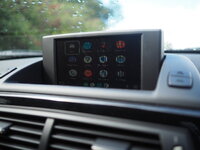
Managed to get it all installed over the bank holiday. Fiddly work but pretty straightforward. Had to get my partner in to plug th cable back into the nav unit as my hands were just too big. Still getting to grips with it but system seems to be working well.
1000160985.jpg
 
I just installed my Carphonics CarPlay unit and happy to share some experiences.

Firstly, dealing with Baris was great. He communicated clearly, and was very knowledgable and helpful in recommending how to exactly configure the system to your specific car and options. Also dispatching the unit went as promised (I picked it up during a visit to London).

Regarding my car, it is a 2003 E85 Z4 with OEM navigation, Bluetooth and TV tuner. A previous owner also installed a Bluemusic unit connected to the CD changer for both streaming and phone calls.

Bluetooth connection
Baris recommend in my situation to use the existing OEM Bluetooth for phone calls. That offers the advantage that it works in all modes, whether you are using the factory system screens (eg radio, menu settings etc) or in the CarPlay mode. An incoming/outgoing call on the OEM Bluetooth will pause/override any other audio source (radio, CD, streaming) being used. Whereas as I understand a call on an aftermarket kit or through the CarPlay will not interrupt for example when you are listening to radio.

He did recommend to upgrade the Bluetooth module to the latest Gen 13 version for most stability and compatibility with most phones. I picked one up from a breakers, and it was a simple box swap. And of course changing the Bluetooth connection on your phone, so you connect to the changed Bluetooth module. I believe you can code the Bluetooth module to have the same Bluetooth ID and password as your old uit, but I didn’t bother. It is a bit of work, requires NCSExpert I believe, and as both ID and password are printed on the module you can just use that information. At the same time I also changed the original (green) OEM microphone at the rear view mirror for a later and supposedly better version.
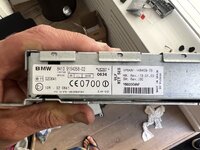
tempImagecj3mHy.jpg
The ’new’ Gen 13 Bluetooth module.

tempImageqqcCON.jpg
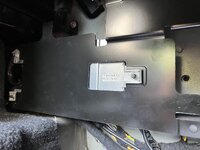
Bluetooth module location. Remove bracket and it is easy to swap the module out.
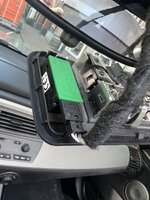
tempImagepsBJZt.jpg
The old green type microphone. The newer types are better and more clear apparently. I have no complaints of people on the other side of the line.

Baris informed me that for the Z4 he recommended using a Bluemusic dongle connected to the CD changer for audio streaming. With me using the OEM Bluetooth I could however not use the already present Bluemusic call & streaming unit. As that meant the phone would ‘see’ two Bluetooth carkits, both the OEM and Bluemusic, causing issues. So he supplied a Bluemusic unit for streaming only. This way the phone uses the OEM Bluetooth for calls, and the Bluemusic for audio streaming (most phones can support two or more different Bluetooth connections). So I simply swapped over the Bluemusic units and job done. Also allowed me to remove the microphone from the previously installed Bluemusic, cleaning up the interior.

Head unit
Baris also recommended for pre-LCI cars to install the head unit of the later LCI cars. This as these are better compatible with the CarPlay unit. These later head units can be recognized by a ‘gold’ finish at the rear of the unit. I picked one up from a breakers.
The LCI head units however have black face plates, whereas the pre-LCI have a grey colour. So a swap of the face plate was needed, quite easy, just a bit of figuring out what parts need to be swapped. What caught me out that on the reverse of the face plate is a metal mounting plate, that also needs to be swapped. So now I have a LCI had unit, a LCI face plate mounting plate, and a pre-LCI face plate.
Oh yeah and getting the center vents out to remove the head unit was a pain. Probably the thing that took the most time of the whole install...
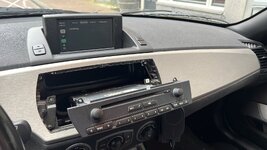
DD3F8A5B-93F1-4393-99DC-60106BA8AAC7.JPG
Checking if it all works, haven’t swapped the face plate of the LCI head unit yet.
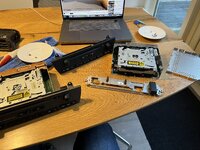
tempImageYBV3fM.jpg
Swapping the face plates.

TV tuner
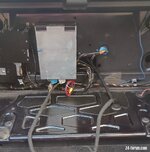
The actual guts of the CarPlay unit are in the modified TV Tuner. As I already had one in the car, it was just a simple swap of the box.
TV Module.jpeg
As I didn’t make a good photo, hereby a photo from the forum of the location of the TV tuner.

Using the module
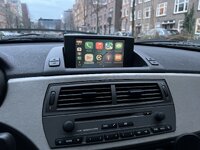
As others have described and shown, it is a great integration of CarPlay in the OEM setup. The combination of the CarPlay unit, OEM Bluetooth, and Bluemusic streaming dongle works great considering it is several systems kind of tied together.
Best way to see it in my case is having factory handsfree calling capability running next to an audio input, either FM radio, a CD, or streaming from your phone through the Bluetooth CD changer dongle. This all works also without using CarPlay. The CarPlay is a sort of overlay that allows control of all of this, and gives access to apps (maps, spotify etc).

Drawbacks to the system is as it is kind of tied together that controlling is limited by the available hardware, so no touchscreen or easy controller. Carphonics have done a great job of making the OEM knobs and buttons work, but is of course not as tightly integrated as a modern infotainment system. Secondly you are limited by the screen, which of course is 20+ year old tech. So resolution is limited but still very usable. And I find the colours a bit ‘washed out’, but that might be some more fine tuning of the settings. Or maybe my particular screen is on it’s last legs...

All in all, my Z4 is my only car, and I also use it for business purposes. So I’m looking forward to using the system, and have a bit more up to date infotainment and navigation available in the car. Whether for a nice Sunday drive, or on a boring commute.
Also I love the OEM look of the car. Honestly, I think there are options out there such as the Viovox system that are a more modern take with a bigger and better (touch)screen and keeping OEM integration. But that means sacrificing the OEM look, and I find the bigger screen a bit intrusive. And living in a big city a big screen planted on your dash is always a target for a break in, heard enough people getting these screens ripped out.
tempImageGxbIXO.jpg

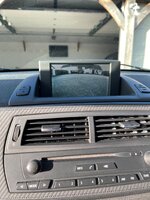
Some further notes. I ordered the unit with the optional reverse camera option (to be installed when weather is nicer), but on installation I noted that my Z4 already had what looked like an aftermarket cable adaptor for that. So maybe check if your car already has one, otherwise no need to add it.
 
Last edited:
The optional reverse option is in the tuner though, so as you swap that with any oem one, you still need that reverse option.

It is a lovely system, I still have to iron out some issues with the reverse camera which then doesn’t return with the normal CarPlay screen but need to send the unit back for that which I haven’t got around to. Second one is if you have multiple phones on the car, you have to ensure the other person switches theirs off as otherwise they “rob” your BT connection and you have no sound when you drive away. Single synched phones are not a problem
 

Attachments

  • IMG_0664.jpeg
    IMG_0664.jpeg
    1.7 MB · Views: 4
  • IMG_9939.jpeg
    IMG_9939.jpeg
    1.3 MB · Views: 5
The optional reverse option is in the tuner though, so as you swap that with any oem one, you still need that reverse option.
With the Carphonics CarPlay module it is indeed in the module. But I believe there is no need for that. I understand that on BMW’s from this time/platform with a TV tuner, you can ‘hijack’ the TV tuner output by putting 12v on a pin in the connector at which point it will accept an ‘external’ video signal. So if you splice 12v from your reverse light, and connect a reverse camera, you can override the TV tuner, and the screen will display the reverse camera.

A adaptor like this should do the trick.

I have what looks like a video connector and 12v connection, so I believe I have some adaptor in place already. It should overide the TV tuner (and CarPlay) when connected correctly.

tempImagezLABQn.jpg

It is a lovely system, I still have to iron out some issues with the reverse camera which then doesn’t return with the normal CarPlay screen but need to send the unit back for that which I haven’t got around to.

I’m planning to connect the camera later this year, and see what the situation is on my unit. Not being in the UK I hope no need to return it!

Second one is if you have multiple phones on the car, you have to ensure the other person switches theirs off as otherwise they “rob” your BT connection and you have no sound when you drive away. Single synched phones are not a problem.

Recognize that, but think that is an issue for any Bluetooth system. Same when my Dad and I step in his car, never sure which phone connects! I think most systems use some logic like the connect the last used phone first.
 
On the last point, if does remember the last user however if the other user wants to use it, it will spin forever trying to start up CarPlay. If my son drives behind me in his car, he will kill my CarPlay session and I have to let it get to sleep (15 mins) before I can get it working again. I haven’t figured out a solution for that problem yet as the having to get the car asleep is taking too long as a solution.

Looking at your name, I think you are in NL? As I am Dutch I travel there regularly so if there ever is a problem that will avoid the whole input duty stuff
 
It will be interesting to see how the signal switching would work. I have never seen an option for an OEM reverse camera for the e85, so what do you think you have in your car that has different input channels for the tuner? I am really curious to see what it is as I have never come across that.
 
Back
Top Bottom