
You are using an out of date browser. It may not display this or other websites correctly.
You should upgrade or use an alternative browser.
You should upgrade or use an alternative browser.
Retrofit Reverse Camera
- Thread starter DaytonZ4
- Start date
A reverse camera was never an option on this car but it can be fitted and connected to the factory idrive via a MMi box, I think it might be possible without the MMi box to but I am not sure. Anubiszed on this forum is your man for this type of stuff.
Like Silverstar says Anubiszed knows how & will post a link to the exact video
If you want to search YouTube type bmw z4 mods in the search bar will get you to his channel as that is the name of it
If you want to search YouTube type bmw z4 mods in the search bar will get you to his channel as that is the name of it

As if by magic, up I pop 
Yes it's possible to have a retrofitted reversing camera, and you have a couple of options....
1, As above fit an MMI box to your current iDrive, this will also give you full Apple CarPlay/Android Auto from your phone. You then simply connect and run a suitable reversing camera to this. All plug-n-play, so no coding required.
This is the screen view you'll have (you can have it in full screen, but the sensor view will be over the right side of the image)
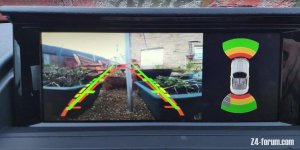
My videos on how to fit an MMI box...
Chinese standard box.. https://www.youtube.com/watch?v=jY-pSPUz0IU&t
And the Mr12volt digital MMI box.. https://www.youtube.com/watch?v=EY4XAzUYiXk
2, You could replace the folding screen with an Android Touchscreen. Again this is all plug-n-play and gives you a host of applications additional to what you currently have (music, nav etc)
Please note this was with aftermarket reversing sensors, prior to me retrofitting OEM PDC, so may look slightly different)
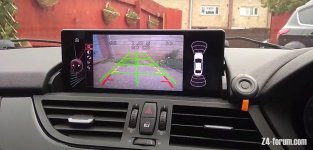
My video on how to fit an Android screen... https://www.youtube.com/watch?v=VC9VFJBDFQM&t
3, For the purists amongst us, you can retrofit a reversing camera into the original iDrive. Although it was never an option on the E89 it can be done with the aid of an aftermarket emulator box and a bit of coding. The proviso though is that you must have OEM PDC already installed.
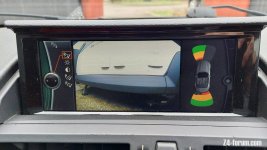
This is my current set-up, even though I do have the Mr12volt MMI box installed, I just like the OEM look of it
I currently don't have a video on this install just yet, I'll get around to this later in the year.
Hope that helps
EDIT** There is a 4th option (well 3.5 actually )
You can go full OEM with this method...
https://www.m3post.com/forums/showthread.php?t=1720680
Well as "full OEM" goes anyway.
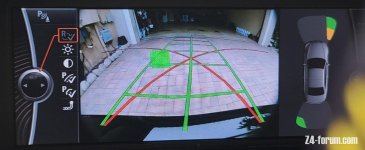
On my OEM photo above you'll see 5 "buttons" on the left of the image, in my version with the aftermarket emulator they don't do anything, but with this method, linked above, they should be all functional, including reversing direction bars on the image.
Yes it's possible to have a retrofitted reversing camera, and you have a couple of options....
1, As above fit an MMI box to your current iDrive, this will also give you full Apple CarPlay/Android Auto from your phone. You then simply connect and run a suitable reversing camera to this. All plug-n-play, so no coding required.
This is the screen view you'll have (you can have it in full screen, but the sensor view will be over the right side of the image)
My videos on how to fit an MMI box...
Chinese standard box.. https://www.youtube.com/watch?v=jY-pSPUz0IU&t
And the Mr12volt digital MMI box.. https://www.youtube.com/watch?v=EY4XAzUYiXk
2, You could replace the folding screen with an Android Touchscreen. Again this is all plug-n-play and gives you a host of applications additional to what you currently have (music, nav etc)
Please note this was with aftermarket reversing sensors, prior to me retrofitting OEM PDC, so may look slightly different)
My video on how to fit an Android screen... https://www.youtube.com/watch?v=VC9VFJBDFQM&t
3, For the purists amongst us, you can retrofit a reversing camera into the original iDrive. Although it was never an option on the E89 it can be done with the aid of an aftermarket emulator box and a bit of coding. The proviso though is that you must have OEM PDC already installed.
This is my current set-up, even though I do have the Mr12volt MMI box installed, I just like the OEM look of it
I currently don't have a video on this install just yet, I'll get around to this later in the year.
Hope that helps
EDIT** There is a 4th option (well 3.5 actually
)You can go full OEM with this method...
https://www.m3post.com/forums/showthread.php?t=1720680
Well as "full OEM" goes anyway.
On my OEM photo above you'll see 5 "buttons" on the left of the image, in my version with the aftermarket emulator they don't do anything, but with this method, linked above, they should be all functional, including reversing direction bars on the image.
It's the switching that would be the thing. As the screen is changed automatically once you activate tge PDC circuit (hence why you need PDC installed already), there is no other way to change the screen view.flybobbie said:Does the feed to the screen say have a composite video input, could just switch between normal input of camera input?
Thank youblazej said:Not that I will be doing any of this but the sheer amount of knowledge, skills and resources you're sharing with the forum, AnubisZed, is very impressive!
Other members helped me when I first owned my Z4, so I like to give back to the Z4 community. And my job quite often gives me the time to do research in between actually working
Bit of an old thread, but where did you draw power from for the camera?
I'm used to connecting cameras and sensors to the reversing light feed, but I've tried that on the Zed and I'm getting odd results.
With the engine off and ignition in accessory, everything works fine when reverse is selected. But with the engine running, I select reverse and there's a brief flicker of the camera and then a black screen.
I assume it must be drawing too much power and that I'd need to use a relay and have the reverse lights as the trigger then source power from somewhere else? Or is the problem something else?
I have the current Mr12Volt installed and a cheapo camera from AliExpress.
I'm used to connecting cameras and sensors to the reversing light feed, but I've tried that on the Zed and I'm getting odd results.
With the engine off and ignition in accessory, everything works fine when reverse is selected. But with the engine running, I select reverse and there's a brief flicker of the camera and then a black screen.
I assume it must be drawing too much power and that I'd need to use a relay and have the reverse lights as the trigger then source power from somewhere else? Or is the problem something else?
I have the current Mr12Volt installed and a cheapo camera from AliExpress.

 Scottish Borders
My forward camera does that and 'improves' with time..ie later on less of an issue..weirdBit of an old thread, but where did you draw power from for the camera?
I'm used to connecting cameras and sensors to the reversing light feed, but I've tried that on the Zed and I'm getting odd results.
With the engine off and ignition in accessory, everything works fine when reverse is selected. But with the engine running, I select reverse and there's a brief flicker of the camera and then a black screen.
I assume it must be drawing too much power and that I'd need to use a relay and have the reverse lights as the trigger then source power from somewhere else? Or is the problem something else?
I have the current Mr12Volt installed and a cheapo camera from AliExpress.
This is what I use and recommend, it connects to the reverse light wire and Ground then smooths out the signal giving a proper picture...Bit of an old thread, but where did you draw power from for the camera?
I'm used to connecting cameras and sensors to the reversing light feed, but I've tried that on the Zed and I'm getting odd results.
With the engine off and ignition in accessory, everything works fine when reverse is selected. But with the engine running, I select reverse and there's a brief flicker of the camera and then a black screen.
I assume it must be drawing too much power and that I'd need to use a relay and have the reverse lights as the trigger then source power from somewhere else? Or is the problem something else?
I have the current Mr12Volt installed and a cheapo camera from AliExpress.
Haosie Car Filter Rectifier, DC 12V Car Rectifier, Automotive Backup Power for Automotive Rear View Camera: Amazon.co.uk: Electronics & Photo
Shop Haosie Car Filter Rectifier, DC 12V Car Rectifier, Automotive Backup Power for Automotive Rear View Camera. Free delivery and returns on eligible orders.
www.amazon.co.uk
I have those units one per camera but still have the 'flashing' black screen then stability on the front camera..-This is what I use and recommend, it connects to the reverse light wire and Ground then smooths out the signal giving a proper picture...
Haosie Car Filter Rectifier, DC 12V Car Rectifier, Automotive Backup Power for Automotive Rear View Camera: Amazon.co.uk: Electronics & Photo
Shop Haosie Car Filter Rectifier, DC 12V Car Rectifier, Automotive Backup Power for Automotive Rear View Camera. Free delivery and returns on eligible orders.www.amazon.co.uk

So how are you wiring it? What are you using as your "switched source"?I have those units one per camera but still have the 'flashing' black screen then stability on the front camera..-
Camera video feeds are into the Mr 12 volt as per standard..each camera (3) has its own filter jobbie.. all jobbies are on when the e89 main bus is live..both rear cameras behave all the time one in to Mr 12 Volt other into ID4Motion..just the front that has a mind of its own..as if the can bus logic needs 'warming up'!-So how are you wiring it? What are you using as your "switched source"?
The rear cameras require the filter box because of the way the circuit is powered. But the front ones shouldn't need a filter, depending how it receives it's 12v feed. Personally I'd have probably run these feeds to a spare fuse point on the main fusebox, and use a switching feed to control a relay in the circuit. Maybe a little "old school" but practical.Camera video feeds are into the Mr 12 volt as per standard..each camera (3) has its own filter jobbie.. all jobbies are on when the e89 main bus is live..both rear cameras behave all the time one in to Mr 12 Volt other into ID4Motion..just the front that has a mind of its own..as if the can bus logic needs 'warming up'!-
I’ll take a video of the sequence…out of interest do you ‘get’ other symbology or just a camera feed..on the rear there’s lines / image of the car etc ?The rear cameras require the filter box because of the way the circuit is powered. But the front ones shouldn't need a filter, depending how it receives it's 12v feed. Personally I'd have probably run these feeds to a spare fuse point on the main fusebox, and use a switching feed to control a relay in the circuit. Maybe a little "old school" but practical.
I figured extra filtering wouldn’t hurt ..