Hello everybody,
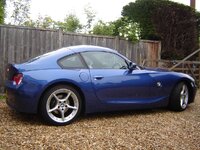
Delighted to say that I have just picked up my new car, a 56 plate Z4C Sport. Previous car was a 225BHP TT Roadster, which was fun, but I'm much happier now.....an extra couple of cylinders make all the difference!
Anyway, only one thing making me scratch my head about the car so far. Didn't know when I bought it, but in the glove box is a lead with an iPod connector. I was pleased to see this, but when i tried it, it didn't seem to be very helpful. Basically I can listen fine, but can only advance one song at a time. A pain when you're trying to get to an album from an artist starting with 'R' for example. Takes ages. Am I being dense? Is there a way of flicking forward by album or playlist at all?
Thanks in advance of any help.
Steve.
Delighted to say that I have just picked up my new car, a 56 plate Z4C Sport. Previous car was a 225BHP TT Roadster, which was fun, but I'm much happier now.....an extra couple of cylinders make all the difference!
Anyway, only one thing making me scratch my head about the car so far. Didn't know when I bought it, but in the glove box is a lead with an iPod connector. I was pleased to see this, but when i tried it, it didn't seem to be very helpful. Basically I can listen fine, but can only advance one song at a time. A pain when you're trying to get to an album from an artist starting with 'R' for example. Takes ages. Am I being dense? Is there a way of flicking forward by album or playlist at all?
Thanks in advance of any help.
Steve.


 so i'll scan the manual tomorrow at work. If you pm me I'll send you a copy of the manual. If I knew how to host it properly ,I'd post it on line so if someone wants to volunteer to host it I'll send them the pdf too. There's really no more information that what I've said in this post