Ok so ive got virgin media fibre optic broadband with a 60mb connection. now when i use the superhub with an network cable and connect it directly to my laptop im getting the full 60mb download speeds when testing however, wireless test have been coming back with me getting not even 1mb speeds!!! after a quick 15 minute call to VM its now gone up to 30mb on wireless tests! However, they are now saying that my wireless adaptor in my laptop will no go up to 60mb and this is why its not getting the full 60mb over wireless! now the adaptor in my laptop (a Sony VAIO under 12 months old and costing over £800) says it can handle up to 150mbs and all the drivers are current! this is the name of the adaptor atheros ar9285! any ideas guys?

You are using an out of date browser. It may not display this or other websites correctly.
You should upgrade or use an alternative browser.
You should upgrade or use an alternative browser.
Need Some IT Help
- Thread starter Nova2k7
- Start date
That's an 802.11n chipset so you need to check that both the laptop and router are set to use 802.11n, If they are running b/g you'll only get up to 54mbps.
Also check you have the latest driver for your laptop.
Also check you have the latest driver for your laptop.
Hey Novak! Only thing I can think of are signal strength, and the wireless frequency. If there's other wireless networks it can sometimes interfere. You can get a tool to show you all wireless networks and their frequency, then manually set yours to something different.
Also worth checking that the router is set to accommodate all wireless standards e.g. 802.11a (11mbps), 802.11g (54mbps) and N(150mbps).
Hope this helps!
Sean
Also worth checking that the router is set to accommodate all wireless standards e.g. 802.11a (11mbps), 802.11g (54mbps) and N(150mbps).
Hope this helps!
Sean
Beat me to it!Stuart Truman said:That's an 802.11n chipset so you need to check that both the laptop and router are set to use 802.11n, If they are running b/g you'll only get up to 54mbps.
Also check you have the latest driver for your laptop.
andywils31
Member
I'd say make sure your wireless access point - in this case likely the Superhub is set to WPA2.
I can't think of the top of my head the exact setting - but the encryption type should be AES rather than TKIP for full speed.
Possibly some more settings to change, but I've never played with a Superhub so not sure what options it exposes.
I can't think of the top of my head the exact setting - but the encryption type should be AES rather than TKIP for full speed.
Possibly some more settings to change, but I've never played with a Superhub so not sure what options it exposes.
This might help:
http://community.virginmedia.com/t5/Wireless-Networking/Superhub-Stupidly-Slow-Wireless/td-p/1207807
Quite a few people having issues with the super hub wireless by the looks of it, and the easy fix is to run it just as a modem and get a dedicated wireless access point
http://community.virginmedia.com/t5/Wireless-Networking/Superhub-Stupidly-Slow-Wireless/td-p/1207807
Quite a few people having issues with the super hub wireless by the looks of it, and the easy fix is to run it just as a modem and get a dedicated wireless access point
Could also be major interference on your wireless channel, try an alternative.
bluestreak56 said:Could also be major interference on your wireless channel, try an alternative.
this is what i thought to begin with but i have no neibourghs! no other wireless networks are even picked up by my laptop or phone!
Sounds like you are running on the g standard instead of n. Check settings on wireless adapter properties on laptop and also on router settings. If they are set to auto try forcing settings to n instead.
Do you have any 3 phase overhead power lines near your house?
Do you have any 3 phase overhead power lines near your house?
GreyZed said:Sounds like you are running on the g standard instead of n. Check settings on wireless adapter properties on laptop and also on router settings. If they are set to auto try forcing settings to n instead.
Do you have any 3 phase overhead power lines near your house?
is this something to do with a setting on my HUB called "Greenfield Mode"? ive just turned this on.
Nova2k7 said:GreyZed said:Sounds like you are running on the g standard instead of n. Check settings on wireless adapter properties on laptop and also on router settings. If they are set to auto try forcing settings to n instead.
Do you have any 3 phase overhead power lines near your house?
is this something to do with a setting on my HUB called "Greenfield Mode"? ive just turned this on.
Yep that's it. Your router will not waste it's time allowing for older a/b/g devices now.
Any better?
GreyZed said:Nova2k7 said:GreyZed said:Sounds like you are running on the g standard instead of n. Check settings on wireless adapter properties on laptop and also on router settings. If they are set to auto try forcing settings to n instead.
Do you have any 3 phase overhead power lines near your house?
is this something to do with a setting on my HUB called "Greenfield Mode"? ive just turned this on.
Yep that's it. Your router will not waste it's time allowing for older a/b/g devices now.
Any better?
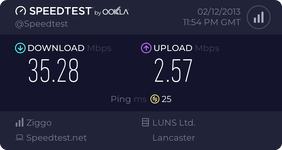
well im using that sppedtest.net and i think its the slow servers rather than my connection! just need to find a decent server to use for the test as currently getting 1mbps again lol
any other speed test websites i can use?
A
Anonymous
Guest
How many walls between your laptop and the router?
Do you have the option of 5Ghz instead of 2.4?
My TalkTalk broadband max's out at about 2.7mb/s, so I'm jealous either way!
Do you have the option of 5Ghz instead of 2.4?
My TalkTalk broadband max's out at about 2.7mb/s, so I'm jealous either way!
kevinmarkwhite said:How many walls between your laptop and the router?
Do you have the option of 5Ghz instead of 2.4?
My TalkTalk broadband max's out at about 2.7mb/s, so I'm jealous either way!
only the one wall, i live in a small apartment! yeah ive got the 5ghz option on the hub but not sure my laptop can use it?
Nova2k7 said:Ok so ive got virgin media fibre optic broadband with a 60mb connection. now when i use the superhub with an network cable and connect it directly to my laptop im getting the full 60mb download speeds when testing however, wireless test have been coming back with me getting not even 1mb speeds!!! after a quick 15 minute call to VM its now gone up to 30mb on wireless tests! However, they are now saying that my wireless adaptor in my laptop will no go up to 60mb and this is why its not getting the full 60mb over wireless! now the adaptor in my laptop (a Sony VAIO under 12 months old and costing over £800) says it can handle up to 150mbs and all the drivers are current! this is the name of the adaptor atheros ar9285! any ideas guys?
30mb!!! I'd be over the moon if I could get 10mb where I live!
Scorp.
ScorpionFrance said:Nova2k7 said:Ok so ive got virgin media fibre optic broadband with a 60mb connection. now when i use the superhub with an network cable and connect it directly to my laptop im getting the full 60mb download speeds when testing however, wireless test have been coming back with me getting not even 1mb speeds!!! after a quick 15 minute call to VM its now gone up to 30mb on wireless tests! However, they are now saying that my wireless adaptor in my laptop will no go up to 60mb and this is why its not getting the full 60mb over wireless! now the adaptor in my laptop (a Sony VAIO under 12 months old and costing over £800) says it can handle up to 150mbs and all the drivers are current! this is the name of the adaptor atheros ar9285! any ideas guys?
30mb!!! I'd be over the moon if I could get 10mb where I live!
Scorp.
lol but i pay for 60! its the principle!