Mr12volt & vibe powerbox question.

KingMmC

Member
 UK
Hi all, have recently taken ownership of a 2016 e89 with iDrive. It has no CD changer and I cant get into the headunit on Bimmercode to find out if its "cdc prepped".
Have a mr12volt and vibe powerbox amp coming at the weekend and unsure if I am going to be able to get it to work given I cant code the headunit.
Would a reset (battery disconnected) potentially solve this? Ive also read in other threads that the MMI box will potentially code the unit when it's switched on for the first time.
Also what is the correct wiring sequence for both the MMI and amp? Amp quad into head unit followed by MMI then main loom or the opposite?

Finally not related but is there a way to clear/unassign the iDrive shortcut buttons? Holding 1&8 together doesn't seem to do anything?

Thanks!
 
Firstly the last bit, radio buttons.
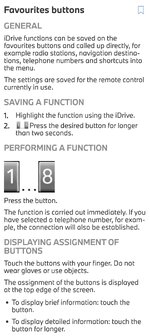
Directly from the manual......
Screenshot_20260304_172233_DRIVERS GUIDE.jpg

I dont work with Bimmercode, but can you call up the VO? You'd be looking for either code 672 (CDC) or 696 (DVD Changer). Or use an online VO Decoder. The physical unit would be in the glovebox.

As for coding, the mmi box will NOT code the headunit, it'll only set the mp3 coding, you will need to code 672 if its not already there. But due to the way it now connects you must do any coding before you connect the mmi loom, as it blocks coding afterwards.

As for fitting the two Y looms.... GOOD LUCK!! That's a lot of extra wire and extra connectors to fit in a very tight space. It's not impossible, but with be a right PITA to achieve. Not really sure of the best combination, possibly, as you say, amp into headunit then mmi box into that with the OEM Quadlock connector into that.

Hope that helps.
 
Firstly the last bit, radio buttons.
Directly from the manual......
View attachment 291237

I dont work with Bimmercode, but can you call up the VO? You'd be looking for either code 672 (CDC) or 696 (DVD Changer). Or use an online VO Decoder. The physical unit would be in the glovebox.

As for coding, the mmi box will NOT code the headunit, it'll only set the mp3 coding, you will need to code 672 if its not already there. But due to the way it now connects you must do any coding before you connect the mmi loom, as it blocks coding afterwards.

As for fitting the two Y looms.... GOOD LUCK!! That's a lot of extra wire and extra connectors to fit in a very tight space. It's not impossible, but with be a right PITA to achieve. Not really sure of the best combination, possibly, as you say, amp into headunit then mmi box into that with the OEM Quadlock connector into that.

Hope that helps.
Thanks for the quick response!
Unfortunately I checked the VIN and dont have either 672 or 696. I suspect there may be an amp from the previous owner as it would explain being unable to read the head unit and the speakers are stock but actually sound pretty punchy... will find out at the weekend. Have the aliexpress specials on order anyway 😅.

I assume adding 672 is not possible with Bimmercode expert mode?

If amp is present ill stick mr12volt behind the ac controls and if no amp well ill go rooting around the transmission tunnel or footwell for a spot as 4 quadlocks will take up a lot of room...

The memory buttons are all programed to random radio stations but have overridden the ones I want but I was looking to clear the ones i don't need so that they dont do anything.
 
Just had the headunit out to check and there is nothingall stock however have
C540: Loudspeaker output lines, front left: line interruption
C544: Speaker output lines front right: line interruption
C548: Loudspeaker output lines, rear left: line interruption
C54C: Speaker output cables rear right: line interruption
...
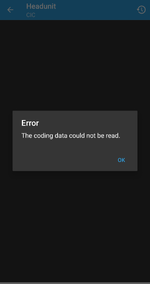
Bimmercode giving me the attached.
Will try a different device on Friday to see if I can access it then...
 

Attachments

  • 1772658148085.png
    1772658148085.png
    128.2 KB · Views: 6
You need to sort the coding out before plugging the mmi box in..after that you can’t code it..
Just had the headunit out to check and there is nothingall stock however have
C540: Loudspeaker output lines, front left: line interruption
C544: Speaker output lines front right: line interruption
C548: Loudspeaker output lines, rear left: line interruption
C54C: Speaker output cables rear right: line interruption
...
Bimmercode giving me the attached.
Will try a different device on Friday to see if I can access it then...
Looks like an amp hiding elsewhere..
 
You need to sort the coding out before plugging the mmi box in..after that you can’t code it..

Looks like an amp hiding elsewhere..
Will check boot and around glovebox tomorrow... any other hiding place ideas?
 
Will check boot and around glovebox tomorrow... any other hiding place ideas?
If it’s a vibe amp it’s quite small ..could be in lots of places…behind carpet in footwell..

Maybe the speakers have already been changed?
 
Thinking from your first post here....
Nothing would be interfering with coding unless the canbus lines are intercepted, broken or cut.
So I'd recommend checking the Quadlock connector and see what state the two wires are in. You're looking for a pair of Green wires (one is just Green the other is Green with an Orange stripe) that are twisted, they should be in pins 9 and 11 respectively.
I suspect these are perfectly fine, as otherwise you wouldn't be able to control your idrive, as the controller works on the canbus as well. So I think this is a coding issue, alas not working with Bimmercode means I don't know the correct sequence for this. But if you want to trawl through (or better still search) this thread you might find what you need....
 
I had the same thing with mine - I sorted it all with bimmercode expert mode.

You cannot change the VO in bimmercode, but my understanding is that the VO is essentially a selection of other items, which you absolutely can select individually in bimmercode expert mode & configure for the Mr 12 volt.

Did consider the vibe amp also - but decided against. Speaker upgrades made it feel unnecessary, and was concerned about the 2 big wiring plugs & how to make them fit.

Regards the shortcut buttons for the radio - you don't need to hold #1 & #8 to reset anything. Reprogramming is as simple as going to the thing you want & holding in the button.

No idea how you might clear/reset to nothing though.
 
Thank you for the responses! Confirmed speakers are OEM base models. Will root around in search of an amp this evening.

Quadlock looked in good condition all wires seated correctly and iDrive works fine/no issues.

I have binned off Bimmercode and will use Protools going forward. Assuming the VO code goes through on the app is there a way to confirm its worked? Guessing I would see a CD changer in iDrive if successful? If that then works I just fit mr12volt and cross my fingers?

Will post how I get on with the amp search...
 
Protool definitely does VO..

CD chamber should appear under normal CD in list
 
Assuming the VO code goes through on the app is there a way to confirm its worked? Guessing I would see a CD changer in iDrive if successful? If that then works I just fit mr12volt and cross my fingers?
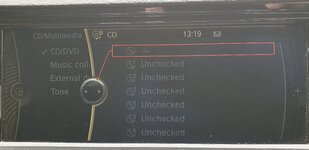
Yes, press CD (MEDIA), then into CD/DVD and you'll either have one CD option (didn't work) or you'll have 6 options (worked)!
 
Could not for the life of me find an amp, new obd adapter for protools comes tomorrow so hopefully can get into coding the headunit and VO without issue. Will see how the coding goes tomorrow....
 
  • Like
Reactions: B21
Wish I had gone for protool from the start! Interface is not as intimidating as I was led to believe. Assume from the below I am now ready to go with the install? Plan is to stick the box behind AC controls. Im hoping its on latest firmware due to sd card shortage at home! Apart from disconnecting positive terminal, nothing else to prep or watch out for?
 

Attachments

  • 20260306_133355.jpg
    20260306_133355.jpg
    410.2 KB · Views: 5
Wish I had gone for protool from the start! Interface is not as intimidating as I was led to believe. Assume from the below I am now ready to go with the install? Plan is to stick the box behind AC controls. Im hoping its on latest firmware due to sd card shortage at home! Apart from disconnecting positive terminal, nothing else to prep or watch out for?
Looking better..I put mine behind the HVAC plenty of space..be VERY careful to reseat the HVAC connectors..either nothing works or heater is on full hot on the screen with lots of error codes..
 
Wish I had gone for protool from the start! Interface is not as intimidating as I was led to believe. Assume from the below I am now ready to go with the install? Plan is to stick the box behind AC controls. Im hoping its on latest firmware due to sd card shortage at home! Apart from disconnecting positive terminal, nothing else to prep or watch out for?
Firstly, well done, yes that is CDC. Coding - successfull (y)

Personally for a standard mmi box then yes behind the air-con panel is a very goid spot. But for the Mr12volt box I'd recommend placing it on top of the glovebox. This way you can run the USB directly into the glovebox via the hole at the back. Also you can fit one of these for future updates...

Check out my video on how I've done this...
 
Thanks for all the tips and help! Ended up sticking it behind the AC after checking for update and it was easy enough to remove dash trim and seat it there. Hardest part was putting the headunit back in with all the new cables! Glad I didnt go with the amp in the end....
Seems to be working fine although when I hit the voice button on the wheel, it goes into BMW phone mode then cancels itself and reopens andriod auto where I can then speak. Coded out $620 so unsure why its doing that but I can live with it.
Speakers are the next job once they land.
Thanks again everyone!
 
You need the apple fix /ios 26 update fix to address that
 
If you are using Android Auto, then using the iDrive controller you simply flick over to the side bar and scroll down to the microphone symbol, press that and "Hey Google" starts as normal, no need to code out 620.
 
Back
Top Bottom