Installed aftermarket Pioneer receiver - Speakers won't play

Tamir

Member
 Israel
Hey everyone

I bought a Pioneer receiver (SPH-10BT) and also got with it the antenna adapter + single DIN radio trim adapter + wiring harness for Pioneer:
https://www.crutchfield.com/p_130SPH10BT/Pioneer-SPH-10BT.html
https://www.crutchfield.com/p_120999303/Metra-99-9303-BMW-Kit.html
https://www.crutchfield.com/p_12040EU10/Metra-40-EU10-Antenna-Adapter.html
https://www.ebay.com/itm/16Pin-Car-Stereo-Radio-Wiring-Harness-Connector-Plug-ISO-PI100-For-Pioneer-03-on/292286655458

The new receiver gets power, it does turn on, but the speakers don't work at all.

Before installing this receiver I had the original BMW system, no NAV no DSP, but I have the 10 speakers package

Does anyone know what other parts I need to get in order to get this Pioneer receiver to work fully?
 
What system did you have installed beforehand?

My understanding is if you had the DSP system, which comes with its own amp, you're out of luck.

In these systems the speakers are controlled with the amp. And the amp won't switch on without the original head unit in place. In the DSP systems, the audio signal is transmitted from the head unit via an optical cable to the amp. The amp then send the audio to the speakers.

If you had one of the DSP systems, effectively you currently have no connection between the speakers and the head unit.
 
Z-4-FUN said:
What system did you have installed beforehand?

My understanding is if you had the DSP system, which comes with its own amp, you're out of luck.

In these systems the speakers are controlled with the amp. And the amp won't switch on without the original head unit in place. In the DSP systems, the audio signal is transmitted from the head unit via an optical cable to the amp. The amp then send the audio to the speakers.

If you had one of the DSP systems, effectively you currently have no connection between the speakers and the head unit.

See here: https://z4-forum.com/forum/viewtopic.php?t=34777
 
Z-4-FUN said:
What system did you have installed beforehand?

My understanding is if you had the DSP system, which comes with its own amp, you're out of luck.

In these systems the speakers are controlled with the amp. And the amp won't switch on without the original head unit in place. In the DSP systems, the audio signal is transmitted from the head unit via an optical cable to the amp. The amp then send the audio to the speakers.

If you had one of the DSP systems, effectively you currently have no connection between the speakers and the head unit.

Before installing this receiver I had the original BMW system, no NAV , but I have the 10 speakers package
 
So following up on that link, I used a VIN decoder site and looks like it's DSP
S677A HiFi System Professional DSP
 
Tamir said:
So following up on that link, I used a VIN decoder site and looks like it's DSP
S677A HiFi System Professional DSP

That's leaves you with a bit of a predicament.

Effectively, you no longer have a connection between the speakers and your head unit. And the wiring to the various speakers originates from the amp in the rear of the car.

I believe you might be able to buy a DSP bypass harness, which effectively runs cables from the head unit to the speaker connection block at the amp. As per its name, it "bypasses" the DSP and essentially connects the speaker outputs from the new head unit to the existing speakers in the car. I have no experience of these, but know about them as I was reading about them recently as I also want to do an audio upgrade sometime soon-ish. With this option, you'd have to install the harness through the car - not a trivial job.

I think the original BMW speakers might also be a strange impedance.

The other option is to get new speakers and run new cables directly from the head unit to the speakers.
 
See this thread...it won’t be that simple..

https://z4-forum.com/forum/viewtopic.php?f=3&t=118541
 
Z-4-FUN said:
That's leaves you with a bit of a predicament.

Effectively, you no longer have a connection between the speakers and your head unit. And the wiring to the various speakers originates from the amp in the rear of the car.

I believe you might be able to buy a DSP bypass harness, which effectively runs cables from the head unit to the speaker connection block at the amp. As per its name, it "bypasses" the DSP and essentially connects the speaker outputs from the new head unit to the existing speakers in the car. I have no experience of these, but know about them as I was reading about them recently as I also want to do an audio upgrade sometime soon-ish. With this option, you'd have to install the harness through the car - not a trivial job.

I think the original BMW speakers might also be a strange impedance.

The other option is to get new speakers and run new cables directly from the head unit to the speakers.
Thanks for taking the time to help me out here. I might as well just sell this Pioneer receiver and go back to the original head unit which is in fine condition, just lacks bluetooth and/or Aux. Do you know anything about upgrading the original head unit with bluetooth/aux options?
 
Yep. As per, others have stated you're out of luck.
I researched the possibility of upgrading to a better/beefier amp when my carver amp suffered water-ingress damage and discovered the caveat of being stuck with having to source another original carver amp.
Unless you go down the route of having a professional installation done I'd suggest sticking with your original gear and investing in a bluetooth solution to add extra audio sources.
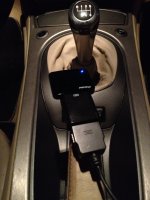
I have the original ipod prep cable installed and use a bt dongle and voltage converter dongle to interface with my android phone.
WOrks a treat.

Photo 08-09-2016 20 57 09.jpg
 
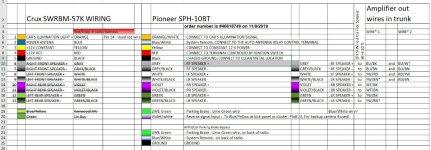
I have the same Pioneer SPH-10BT, If you bought parts from Crutchfield they will help you with your installation problems. On mine I needed to run a 10 wire line to the rear and splice in on the out side of the amplifier. They sell the 10 wire cable at Crutchfield.
 

Attachments

  • Wire connections  1-16-20 (2).jpg
    Wire connections 1-16-20 (2).jpg
    180.3 KB · Views: 420
Back
Top Bottom