
You are using an out of date browser. It may not display this or other websites correctly.
You should upgrade or use an alternative browser.
You should upgrade or use an alternative browser.
Bluetooth prep?
- Thread starter TheRuss
- Start date
Having done it I can tell you it's not an easy retrofit and few Zeds have wiring in place. I really like it due to the integration, but would not do it again, as aftermarket has moved on so much.
If it's important to you it would be best to find a different Zed, or consider an aftermarket solution.
Without bluetooth the MFSW control radio/cd volume, station and track change.
If it's important to you it would be best to find a different Zed, or consider an aftermarket solution.
Without bluetooth the MFSW control radio/cd volume, station and track change.
cj10jeeper said:Having done it I can tell you it's not an easy retrofit and few Zeds have wiring in place. I really like it due to the integration, but would not do it again, as aftermarket has moved on so much.
If it's important to you it would be best to find a different Zed, or consider an aftermarket solution.
Without bluetooth the MFSW control radio/cd volume, station and track change.
Thanks. Although I'd like blueooth in the car, in all honesty I doubt I'd ever use it. It'd annoy me to turn on the bluetooth every time I get in the car, and I'm a bit OCD about leaving it switched on all the time, so I wouldn't do that either. Maybe I'll consider a Parrot as a cheaper and easier option, especially if they do one that can display text messages?
If there's no BT fitted to the car I'm looking at, then what does the button with the man speaking on the MFSW do? Nothing?! Or does it have another function? Doing nothing will annoy me...
TheRuss said:cj10jeeper said:Having done it I can tell you it's not an easy retrofit and few Zeds have wiring in place. I really like it due to the integration, but would not do it again, as aftermarket has moved on so much.
If it's important to you it would be best to find a different Zed, or consider an aftermarket solution.
Without bluetooth the MFSW control radio/cd volume, station and track change.
Thanks. Although I'd like blueooth in the car, in all honesty I doubt I'd ever use it. It'd annoy me to turn on the bluetooth every time I get in the car, and I'm a bit OCD about leaving it switched on all the time, so I wouldn't do that either. Maybe I'll consider a Parrot as a cheaper and easier option, especially if they do one that can display text messages?
If there's no BT fitted to the car I'm looking at, then what does the button with the man speaking on the MFSW do? Nothing?! Or does it have another function? Doing nothing will annoy me...
Nothing
It is there as standard on "A" MFSW (which is "standard" with certain radio combinations )in case B/T is spec'd
A good indicator of whether you have bluetooth prep is to look at the rear of the boot (trunk). If you have bluetooth prep then you will have a rectangular protrusion on the wall (which is where the ULF module will mount). See how the carpet from the rear of my boot (which is wedged up in the pic) has the box shape on the left:
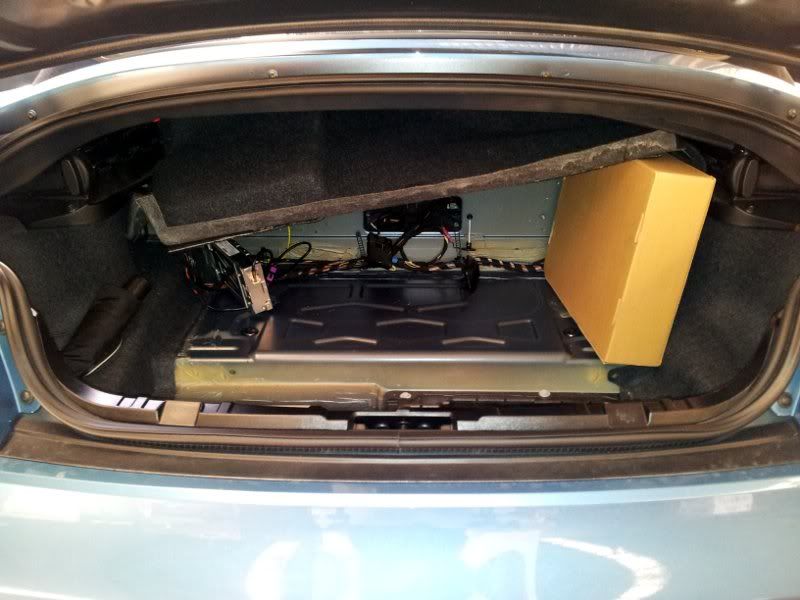
I must note though: while that is a good indication, it's not likely to be definitive. Just because that protrusion isn't there doesn't mean that the wiring loom isn't in place (although unlikely). Probably the best way is to take your VIN to BMW and ask them to print you the car's option list. You want to look for option S640A Car Telephone Preparation.
I must note though: while that is a good indication, it's not likely to be definitive. Just because that protrusion isn't there doesn't mean that the wiring loom isn't in place (although unlikely). Probably the best way is to take your VIN to BMW and ask them to print you the car's option list. You want to look for option S640A Car Telephone Preparation.
No need to go to BMW. If you have a UK BMW, you can get the full list of options yourself from the BMW UK web site.Mangozac said:Probably the best way is to take your VIN to BMW and ask them to print you the car's option list. You want to look for option S640A Car Telephone Preparation.
Go to the website at http://www.bmw.co.uk/bmwuk/homepage/ and from the BMW Owner Area menu at the top, choose Genuine BMW Parts.
On the menu on the left hand side of the page, choose Parts Catalogue. Note the Username and Password (username 'eu111111' and the password 'bmwetk1') and then click on the link at the bottom of the page labelled Electronic parts catalogue. Find genuine spare parts and accessories for your BMW.
After logging on, this will bring up a window where you can enter the last 7 characters of your VIN, This then brings up another window - click on Options at the top of this window, and you should get the full spec as delivered.