
You are using an out of date browser. It may not display this or other websites correctly.
You should upgrade or use an alternative browser.
You should upgrade or use an alternative browser.
LED bulbs for e85
- Thread starter AlexP
- Start date
Ideally you need the "switched off bulb tests" to be coded out using the BMW software (and OBD/USB lead) which is readily available else you'll find LED bulbs will flash noticeably every second or two in response to the testing.
The H7 dipped/high bulb drop-ins won't throw dash errors as they draw enough current but you'll want to disable testing when they're off or they'll flash too.
The H7 dipped/high bulb drop-ins won't throw dash errors as they draw enough current but you'll want to disable testing when they're off or they'll flash too.
Ideally you need the "switched off bulb tests" to be coded out using the BMW software (and OBD/USB lead) which is readily available else you'll find LED bulbs will flash noticeably every second or two in response to the testing.
The H7 dipped/high bulb drop-ins won't throw dash errors as they draw enough current but you'll want to disable testing when they're off or they'll flash too.
Curious, I didn't realize this could be coded out -- do you have any details on the process if you've done this? Like what program and the process? I'm guessing it's something like this? : E46 coding from : e46 fanatics forum
I tried putting orange LEDs in my headlights (Xenon, facelift) "turn signal" bulbs and got the fast blink, so I replaced them with standard bulb elements, but would really prefer LEDs for the turn signal bulbs.
Last edited:
Your link above looks like a tool I’m not familiar with but it seems to make it easy to understand. Carly can do it too…Curious, I didn't realize this could be coded out -- do you have any details on the process if you've done this? Like what program and the process? I'm guessing it's something like this? : E46 coding from : e46 fanatics forum
I tried putting orange LEDs in my headlights (Xenon, facelift) "turn signal" bulbs and got the fast blink, so I replaced them with standard bulb elements, but would really prefer LEDs for the turn signal bulbs.
If you know how to use NCSEXPERT:
For E85/E86.
You read the LSZ module and change these to:
KALTUEBERWACHUNG_xxx -> nicht_aktiv
WARMUEBERWACHUNG_xxx -> nicht_aktiv
(above are Cold Check and Hot Check.)
Where xxx are the specific bulbs you wish to stop checking, e.g. SL for parking lights and AL for low beams - there are different ones for each bulb/function, so quite a few.
Once you’ve changed them, you need to write it back to your LSZ with NCSEXPERT.
I turned off checking for almost all of mine (E86M) see attached NCSEXPERT .TRC File.
Cheers,
Sal
Attachments
Last edited:
I haven't yet done any coding, the general process isn't crazy to me (I do hardware/electronics/software design, amusingly some bits and pieces in newer cars) but the devil is always in the details! I found this thread showing the use of NCS Expert -- is this more or less the process you followed?:
NCS Expert walk through on e46 forums
I guess there's also NCS Dummy which is supposed to help with translation of messages?
NCS Expert walk through on e46 forums
I guess there's also NCS Dummy which is supposed to help with translation of messages?

I haven't yet done any coding, the general process isn't crazy to me (I do hardware/electronics/software design, amusingly some bits and pieces in newer cars) but the devil is always in the details! I found this thread showing the use of NCS Expert -- is this more or less the process you followed?:
NCS Expert walk through on e46 forums
I guess there's also NCS Dummy which is supposed to help with translation of messages?
That guide looks good to me.
I'd also recommend PA Soft's BMW scanner 1.4.0 as above. I have both inpa
/Ncs and 1.4.0. For simple changes like this, BMW scanner is my go to.
For more complex stuff, I go to inpa/NCS, as it has more powerful diagnosis and coding abilities.

 Attleborough, Norfolk
Agreed. Costs £20 and you simply select from tick boxes what you want to ignore.BMW Scanner 1.4 run on a laptop has the ability to switch off the bulb check, its less expensive and easy to use over the NCS Expert and Inpa option.
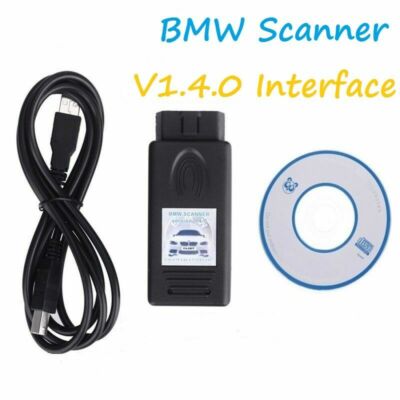
BMW Scanner 1.4.0 Diagnostic Interface Code Reader Scan Tool E53 X5 / E83 X3 E46 | eBay UK
For chassis E38(7') E39(5') E46(3') E53(X5) E83(X3) E85(Z4). Compatible models: BMW E38, E39, E46, E53, E83, E85 and etc. BMW 1.4.0 Diagnostic Interface. With this BMW Scanner, you could connect the car to the computer to do inspection by yourself!
ebay.us
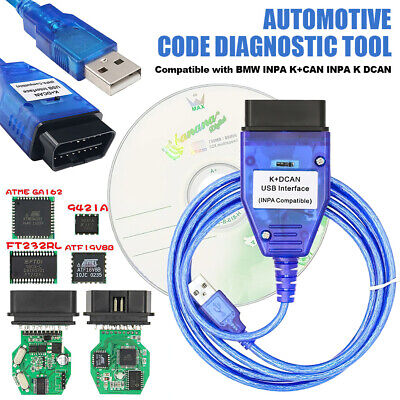
For BMW Inpa K+Dcan OBD2 Cable FTDI FT232RL Chip With Switch UK | eBay UK
Interface USB OBD2 For BMW - INPA/Ediabas - K+DCAN allows full diagnostic of For BMW from 1998 to 2008 (all functions as in OMNITEC interface). Build in 2 lines K and D-Can magisterial. INPA For BMW K+CAN FT232RL Chip with Switch, works on For BMW with 8 pin and with K-LINE protocol.
ebay.us
There's the two options OP. Both will need Windows, ideally 7 or 10. Maybe 11 with a fight, but 7 (or 10, with some driver workarounds) in an isolated virtual machine is the way to go IMO.
Loads of threads online for installation help.
I have Scanner 1.4 running on two separate laptops: one Windows 8 and the other Windows 10. In both cases I simply uploaded the files from the USB that came with it and it worked straight out of the box.
INPA etc (Eidebas Suite) I have on Windows 11, but I did have to ask a friend for help with setting it up. Apparently if you're a computer whizz it's no issue, but I ain't!
INPA etc (Eidebas Suite) I have on Windows 11, but I did have to ask a friend for help with setting it up. Apparently if you're a computer whizz it's no issue, but I ain't!

 Devon
Devon

In general, bulbs should be E-marked to be legal. Anything labelled for off road use means they haven't been certified and weren't allowable. The certification covers how the light is created and spread but I don't think they say it must come from a filament bulb specifically. If the brightness and colour isn't screwy I doubt anyone would ever bother checking, even if they noticed.
For headlights, there is a spec that halogen bulbs should be no more than 1500 lumen and 3000 for HIDs. I don't know if there was ever a specification for the brightness of halogen bulbs allowed in a projector lens which are a disaster with normal 55W bulbs. Ideally they've have allowed 3000 lumen the same as HIDs but they'd have needed 110W bulbs which were never widely available and manufacturers never provided cable sufficient to the job. Being able to put an LED bulb in a halogen projector is a god send as they're positively dangerous otherwise.
Also, boringly, HID protectors and halogen projectors have different optics so LED bulbs ought to match whether it's an H2S or H7 projector.
For headlights, there is a spec that halogen bulbs should be no more than 1500 lumen and 3000 for HIDs. I don't know if there was ever a specification for the brightness of halogen bulbs allowed in a projector lens which are a disaster with normal 55W bulbs. Ideally they've have allowed 3000 lumen the same as HIDs but they'd have needed 110W bulbs which were never widely available and manufacturers never provided cable sufficient to the job. Being able to put an LED bulb in a halogen projector is a god send as they're positively dangerous otherwise.
Also, boringly, HID protectors and halogen projectors have different optics so LED bulbs ought to match whether it's an H2S or H7 projector.
I just wanted to hopefully contribute positively back to this thread. I successfully bought from eBay a 'Scanner 1.40 compatible' adapter to re-code the bulb check so I can use LED bulbs for all lights except the Xenon. The PA software is, as suggested, really easy to use and made the process really fast. Further, it showed some shadow codes that didn't come up when I used INPA.
I had to do two things however in order to make the adapter work on my dedicated Win8.1 64-bit computer I use for car stuff.
1. Modify the FTDI driver INF files so the 'Scanner 1.40' adapter can be recognized by modern Windows -- the 32-bit FTDI drivers the adapters shipped with (or what PA software installs) won't work on modern 64-bit windows ; one has to modify standard FTDI INI files and do a search/replace so the 'Scanner 1.40' can be used.. Further, driving signing has to be disabled since Windows won't install the modified driver.
2. I had to add a short between PIN 7 & PIN 8 of my adapter which is same as what's done on the K-DCAN INPA cable, otherwise PA Soft never could identify the car and/or do anything with it.
I opened the 'Scanner 1.40' adapter and soldered a small wire on those pins (marked on the OBD2 connector, it was on the bottom of the unit I had, PCB had to be removed):
Want to again express my appreciation for those who've shown how LEDs can be used by disabling the cold/hot check and suggesting PA Software to do it!
I had to do two things however in order to make the adapter work on my dedicated Win8.1 64-bit computer I use for car stuff.
1. Modify the FTDI driver INF files so the 'Scanner 1.40' adapter can be recognized by modern Windows -- the 32-bit FTDI drivers the adapters shipped with (or what PA software installs) won't work on modern 64-bit windows ; one has to modify standard FTDI INI files and do a search/replace so the 'Scanner 1.40' can be used.. Further, driving signing has to be disabled since Windows won't install the modified driver.
2. I had to add a short between PIN 7 & PIN 8 of my adapter which is same as what's done on the K-DCAN INPA cable, otherwise PA Soft never could identify the car and/or do anything with it.
I opened the 'Scanner 1.40' adapter and soldered a small wire on those pins (marked on the OBD2 connector, it was on the bottom of the unit I had, PCB had to be removed):
Want to again express my appreciation for those who've shown how LEDs can be used by disabling the cold/hot check and suggesting PA Software to do it!