First of all, I am writing this thinking I have solved the problem. But I haven't finished the job so not 100%. I am not trying to write a how to, just sign post people who may have the same issues as I pretty much got everything I needed to get to where I am from this forum. Feel free to move it if it should be somewhere else.
Airbag Module - Satellite B Pillar Left SBSL
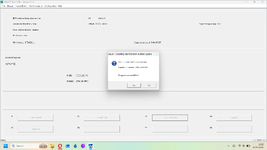
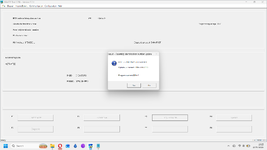
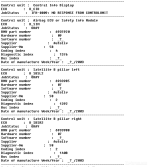
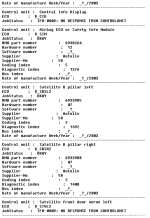
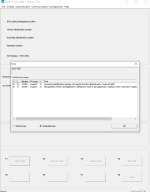
So I have had the airbag light and due to some help of forum members I was able to understand the issue was the B Pillar Module on the passenger side was throwing out multiple error codes:
9892 Control unit fault (E6x) or software error (E85)
9529 Control-unit fault
952B Control-unit fault
952D Control-unit fault
952F Control-unit fault
Suggestions were that it had got wet due to the roof drainage being blocked and overflowing onto it. This has been an issue going on 2 years but I have a friendly garage for MOTs so wasn't under time pressure to solve and I have been overseas a lot so the car has been neglected. I also thought it was a case of removing the seat to change it which I found to be a bit of a daunting task.
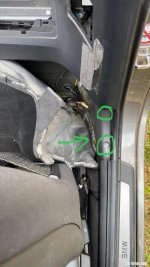
When watching the roof removal video below I decided I was going to have a crack at the airbag module, seeing I had to remove some of the internal trim I found a mention on the bimmerfest that you could get to it without removing the seat.
How I did it is in a post below.
Roof removal
A couple of weeks back I went to put my roof up, the motor ran no problem (located in the boot) and over my shoulder on the drivers side I heard a spray sound. Instant thought was that must be hydraulic fluid spraying down the drainage...
So I decided I am going to take the roof off for the first time, sort the know roof drainage issues at last and find the issue on the hydraulic hose and replace it. I used this video from the forum to remove the roof:
https://www.youtube.com/watch?v=k31nU0FWmtE
It took me about an hour, it was much easier than I expected. I half wonder why I spent hours folding myself into the boot to relocate the motor when I could have done this... but I haven't tried putting it back on yet. You definitely need two people to lift it out.
Drainage wells
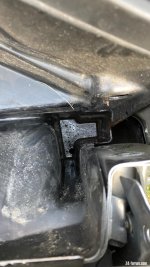
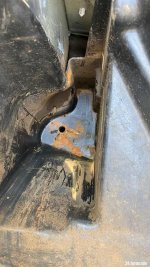
So I got the roof off and found these drainage wells:
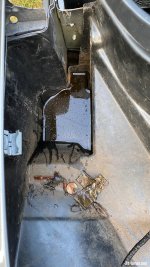
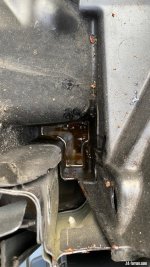
No wonder there was all this damage happening. It was also apparent quite quickly why my roof had failed, the hydraulic hose connections were sat in water as well and corroded. I thought sorting the drainage was a nice to have after relocating my motor, how wrong I was!
After watching some YouTube videos and photos on the forum I managed to get my hand under the car and pull the valves off the end of the drainage. They were completely blocked and I won't be putting them back on. I will keep hold in case the road noise people comment on becomes an issue.
I scooped most of the water out and then soaked up the last bits. Just by clearing the top water would drain slowly. I just a drain cleaning brush to clear the passenger pipe. The driver pipe was much harder as the well is much small so couldn't get much purchase on the brush wire to push it down. I ended up using a small bit of drain unblocked, flushed down with hot water and then the brush.
Both roof drains cleared and water pouring out the bottom.
Roof hydraulic hose replacement
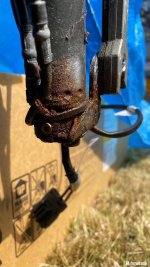
This was the base of my roof that connects near the drivers shoulder. I rigged it up with new fluid and powered the motor to confirm the issue. Hydraulic fluid sprayed out of the connection for cable 14. After a quick bit of cleaning you can clearly see the hole where it had corroded and failed.
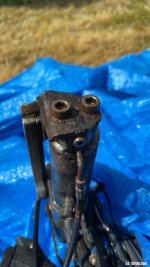
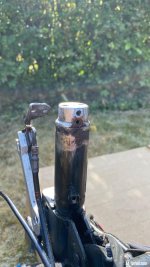
To finish the first day I wanted to get the cable 14 pin removed so now I am just waiting for the new parts to carry on. The screw holding it in place had rounded off so I used a saw to make it a flat head. With a lot of WD40 and drill wire brushing I got the screw out.
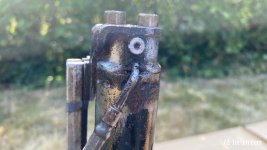
Some more cleaning and I had to get the small plate off that holds the hose in place which had corroded on. It helped to remove the end piece then levered it off using a flat head screwdriver from the bottom.
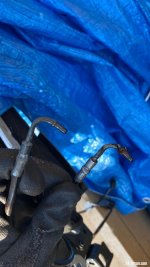
And a final comparison of a good hose pin end vs a corroded one
Parts ordered
I have ordered a new cable from here (£77.59):
https://www.cabriolet-roof-hoses.com/hydraulic-roof-hoses/bmw/bmw-e85-z4-roadster-hydraulic-cabriolet-roof-hoses
These brushes from amazon for the roof drainage(£8.99):
https://www.amazon.co.uk/gp/product/B08QV5WFR3/ref=ppx_yo_dt_b_asin_title_o00_s00?ie=UTF8&psc=1
And this replacement airbag module from eBay (£65.00):
Bmw E85 2003- Front Left Pillar SBSL AIRBAG Module 6945157
My airbag module is 6953009 but I used OEM to check which ones are interchangeable:
https://www.realoem.com/bmw/enUS/partxref?q=65776953009
I bought this OBDII cable from amazon (£25.91):
https://www.amazon.co.uk/gp/product/B098DC49MP/ref=ppx_yo_dt_b_asin_title_o00_s00?ie=UTF8&psc=1
Airbag Module - Satellite B Pillar Left SBSL
So I have had the airbag light and due to some help of forum members I was able to understand the issue was the B Pillar Module on the passenger side was throwing out multiple error codes:
9892 Control unit fault (E6x) or software error (E85)
9529 Control-unit fault
952B Control-unit fault
952D Control-unit fault
952F Control-unit fault
Suggestions were that it had got wet due to the roof drainage being blocked and overflowing onto it. This has been an issue going on 2 years but I have a friendly garage for MOTs so wasn't under time pressure to solve and I have been overseas a lot so the car has been neglected. I also thought it was a case of removing the seat to change it which I found to be a bit of a daunting task.
When watching the roof removal video below I decided I was going to have a crack at the airbag module, seeing I had to remove some of the internal trim I found a mention on the bimmerfest that you could get to it without removing the seat.
How I did it is in a post below.
Roof removal
A couple of weeks back I went to put my roof up, the motor ran no problem (located in the boot) and over my shoulder on the drivers side I heard a spray sound. Instant thought was that must be hydraulic fluid spraying down the drainage...
So I decided I am going to take the roof off for the first time, sort the know roof drainage issues at last and find the issue on the hydraulic hose and replace it. I used this video from the forum to remove the roof:
https://www.youtube.com/watch?v=k31nU0FWmtE
It took me about an hour, it was much easier than I expected. I half wonder why I spent hours folding myself into the boot to relocate the motor when I could have done this... but I haven't tried putting it back on yet. You definitely need two people to lift it out.
Drainage wells
So I got the roof off and found these drainage wells:
No wonder there was all this damage happening. It was also apparent quite quickly why my roof had failed, the hydraulic hose connections were sat in water as well and corroded. I thought sorting the drainage was a nice to have after relocating my motor, how wrong I was!
After watching some YouTube videos and photos on the forum I managed to get my hand under the car and pull the valves off the end of the drainage. They were completely blocked and I won't be putting them back on. I will keep hold in case the road noise people comment on becomes an issue.
I scooped most of the water out and then soaked up the last bits. Just by clearing the top water would drain slowly. I just a drain cleaning brush to clear the passenger pipe. The driver pipe was much harder as the well is much small so couldn't get much purchase on the brush wire to push it down. I ended up using a small bit of drain unblocked, flushed down with hot water and then the brush.
Both roof drains cleared and water pouring out the bottom.
Roof hydraulic hose replacement
This was the base of my roof that connects near the drivers shoulder. I rigged it up with new fluid and powered the motor to confirm the issue. Hydraulic fluid sprayed out of the connection for cable 14. After a quick bit of cleaning you can clearly see the hole where it had corroded and failed.
To finish the first day I wanted to get the cable 14 pin removed so now I am just waiting for the new parts to carry on. The screw holding it in place had rounded off so I used a saw to make it a flat head. With a lot of WD40 and drill wire brushing I got the screw out.
Some more cleaning and I had to get the small plate off that holds the hose in place which had corroded on. It helped to remove the end piece then levered it off using a flat head screwdriver from the bottom.
And a final comparison of a good hose pin end vs a corroded one
Parts ordered
I have ordered a new cable from here (£77.59):
https://www.cabriolet-roof-hoses.com/hydraulic-roof-hoses/bmw/bmw-e85-z4-roadster-hydraulic-cabriolet-roof-hoses
These brushes from amazon for the roof drainage(£8.99):
https://www.amazon.co.uk/gp/product/B08QV5WFR3/ref=ppx_yo_dt_b_asin_title_o00_s00?ie=UTF8&psc=1
And this replacement airbag module from eBay (£65.00):
Bmw E85 2003- Front Left Pillar SBSL AIRBAG Module 6945157
My airbag module is 6953009 but I used OEM to check which ones are interchangeable:
https://www.realoem.com/bmw/enUS/partxref?q=65776953009
I bought this OBDII cable from amazon (£25.91):
https://www.amazon.co.uk/gp/product/B098DC49MP/ref=ppx_yo_dt_b_asin_title_o00_s00?ie=UTF8&psc=1

 Attleborough, Norfolk



 Bridgend, Wales