3d printing help - phone holder

Hi all, I'm very interested in giving this 3d printed phone holder a go (massive thanks to the person who created this):

https://www.thingiverse.com/thing:793438

The problem is this is for an iPhone 6 and my phone is a different size.

Can anyone help by telling me the easiest program to use to resize just the phone bit? I've tried lots of free software but can't figure it out (I know nothing of 3d printing!)

Thanks
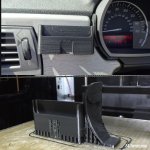
 

Attachments

  • IMG_20210529_210145.jpg
    IMG_20210529_210145.jpg
    150.4 KB · Views: 698
Amazingly, I have been trying to resize the exact same design :)
I'd like it to take a slightly larger phone too (around 100mm x 10mm).
Kudos and thanks to the original designer for freely providing the stl file.
 
If your 3D printer uses Cura to splice you can use the scale function within, however if you scale it up, where it fits into the binnacle won’t fit any more because everything will be enlarged.
 
I found that with Autodesk Meshmixer you can split the base of the phone holder into two sections (in the Edit->Plane Cut function). They can then be moved apart in order to lengthen the holder, but I cannot figure out how to fill the gap to rejoin the two halves.
 
Sketchup will be the easiest 3D design tool you can learn.
I am pretty sure it’s free, you can watch youtube to learn it quickly. It’s very intuitive software.

You can import the model and adapt it.
 
Deepseaskateboard said:
Sketchup will be the easiest 3D design tool you can learn.
I am pretty sure it’s free, you can watch youtube to learn it quickly. It’s very intuitive software.

You can import the model and adapt it.
Thanks. I have had a go of Sketchup before (free web version), but when I import the above model I cannot work out how to cut it into two separate pieces.
 
Back
Top Bottom